PCB Assembly
Lolly Zheng- Sales Account Manager at NextPCB.com

 NextPCB Capabilities
Printed Circuit Boards
 Process Capabilities
 PCB Design-Aid & Layout
 Quality
 Drills & Throughplating
 Factory & Certificate
 PCB Assembly Factory Show
Certificate

Support Team
Feedback:
support@nextpcb.com


Short answer: There is no single best ESP32. Choose the ESP32-S3 for voice, camera, display and on-device AI projects. Choose the ESP32-C3 for low-cost Wi-Fi and Bluetooth LE devices. Choose the ESP32-C6 for Matter, Thread and Zigbee smart-home products. Choose the original ESP32 when you need Bluetooth Classic or are maintaining an existing design. Decide on requirements first, then check interfaces, memory and budget.
| Feature | ESP32 (classic) | ESP32-S3 | ESP32-C3 | ESP32-C6 |
|---|---|---|---|---|
| CPU | Dual-core Xtensa LX6, up to 240 MHz | Dual-core Xtensa LX7, up to 240 MHz | Single-core RISC-V, up to 160 MHz | Single-core RISC-V, up to 160 MHz, plus a low-power core |
| Wi-Fi | Wi-Fi 4 (2.4 GHz) | Wi-Fi 4 (2.4 GHz) | Wi-Fi 4 (2.4 GHz) | Wi-Fi 6 (2.4 GHz) |
| Bluetooth | Classic + BLE | BLE 5 | BLE 5 | BLE 5 |
| Thread / Zigbee (802.15.4) | No | No | No | Yes |
| Programmable GPIOs | 34 | 45 | 22 | 30 (QFN40) or 22 (QFN32) |
| USB | No native USB | USB OTG + Serial/JTAG | USB Serial/JTAG | USB Serial/JTAG |
| PSRAM | On WROVER-type modules | Supported | Not supported | Not supported |
| Typical use | General development, Bluetooth Classic, legacy designs | Voice, camera, display, edge AI | Low-cost connected devices | Matter and smart home |
Specifications for the S3, C3 and C6 follow Espressif's product pages and datasheets: ESP32-S3, ESP32-C3 and ESP32-C6. Always confirm details for your exact chip or module in its datasheet before finalizing a design.
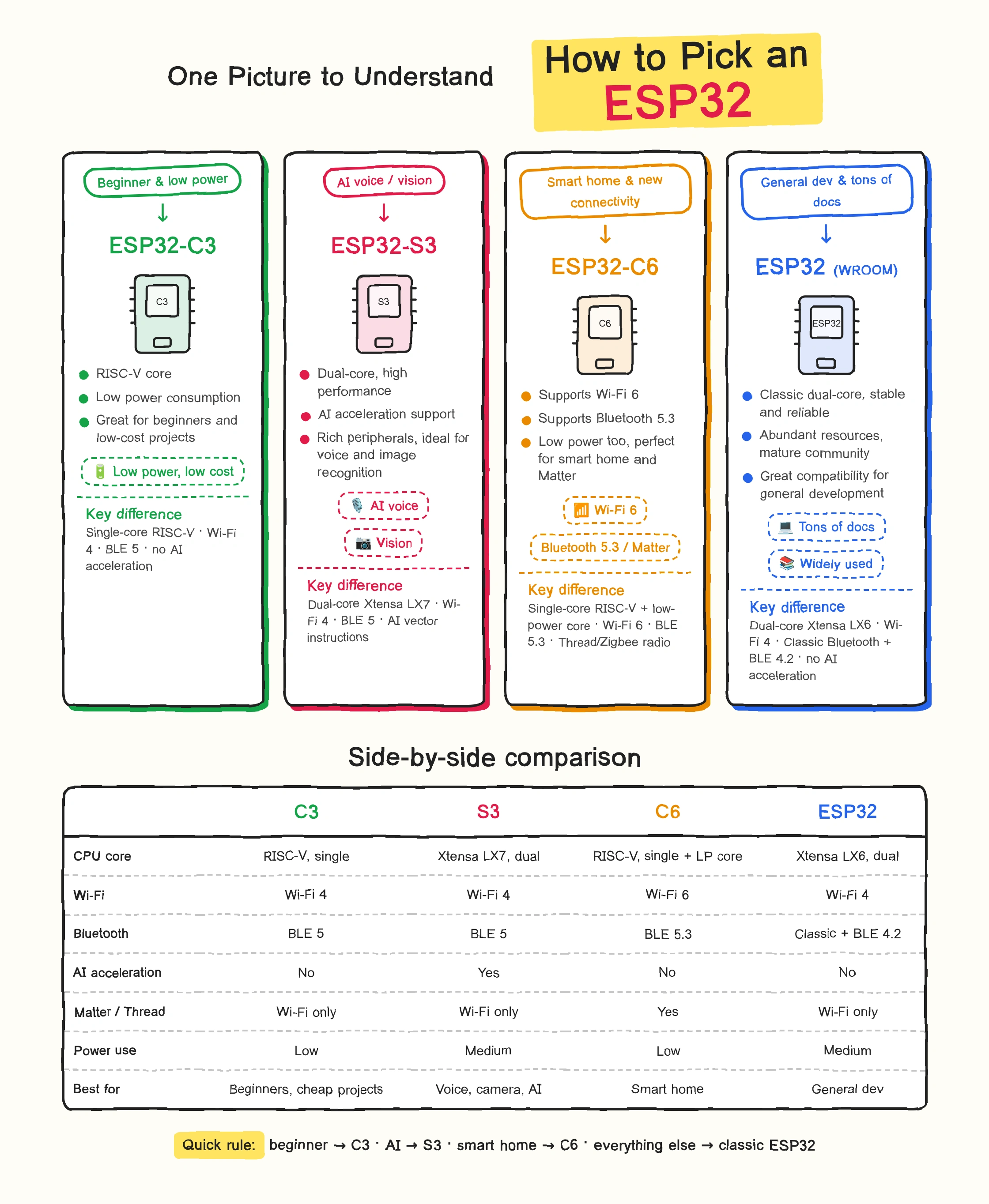
Espressif describes the ESP32-S3 as a dual-core Xtensa LX7 MCU running up to 240 MHz, with 512 KB of internal SRAM, 2.4 GHz Wi-Fi, Bluetooth 5 (LE), 45 programmable GPIOs, PSRAM support, and vector instructions that accelerate neural-network and signal-processing workloads. Its USB OTG support also means the chip can handle programming and console over USB.
That combination makes it the usual choice for products that handle audio, images or a screen. Camera frames and display buffers need memory, which is why PSRAM support matters. One community camera project on our blog runs live video streaming on an ESP32-S3 with an OV3660 sensor, buffering JPEG images in PSRAM.
A note on "AI" expectations: most ESP32-based AI products send audio or images over Wi-Fi to a cloud service and use the ESP32 for capture, playback and device control. The S3 additionally lets you run lightweight models locally, such as keyword spotting or basic object detection. Large models do not run on the chip itself. The S3 does not support Bluetooth Classic.
The ESP32-C3 uses a single 32-bit RISC-V core at up to 160 MHz, with 400 KB of SRAM, 22 programmable GPIOs, Wi-Fi and Bluetooth 5 (LE). It has no PSRAM support and no USB OTG, so it is not the right fit for camera or display-heavy products. For smart plugs, sensor nodes and small connected devices, it covers the requirements with fewer pins and a simpler design.
If you plan a chip-down design, check the lifecycle status of the exact C3 variant. Espressif's ESP32-C3 datasheet lists some package variants as end of life or not recommended for new designs.
The ESP32-C6 is Espressif's first Wi-Fi 6 SoC. It combines 2.4 GHz Wi-Fi 6, Bluetooth 5 (LE) and an IEEE 802.15.4 radio, which makes Thread and Zigbee available, and Espressif positions it for building Matter Wi-Fi and Matter Thread end devices. It also has 512 KB of SRAM and a separate low-power RISC-V core.
Its Wi-Fi 6 radio works on the 2.4 GHz band with 20 MHz channels in 802.11ax mode, so the benefit is efficiency and low power rather than high throughput. If your product does not need Thread, Zigbee or Matter, the C3 is simpler.
The original ESP32 remains the right choice in two cases: you need Bluetooth Classic, which the S3, C3 and C6 do not support, or you are maintaining a product or codebase built on it. It also has a large base of tutorials and community examples. For new designs that only need Bluetooth LE, a newer variant is usually the better starting point. If you use classic modules, our ESP32 antenna design guide covers module revisions and antenna options.
| Question | What it affects | Usual choice |
|---|---|---|
| Does the device need voice input or output? | I2S microphone and speaker interfaces, processing headroom, whether any speech or keyword processing runs locally | S3 for local processing; any ESP32 if audio is streamed to the cloud |
| Does it need a camera or display? | Memory for frame buffers, GPIO count, camera and display interfaces | S3 |
| What connectivity does it need? | Wi-Fi 4 or Wi-Fi 6, BLE only or also Bluetooth Classic, Thread, Zigbee, Matter | C3 (Wi-Fi + BLE), C6 (Wi-Fi 6, Thread, Zigbee, Matter), classic ESP32 (Bluetooth Classic) |
| How is it powered? | Battery capacity, charging, regulator sizing, sleep behavior | Depends on duty cycle and radio use more than on the chip name alone |
Choosing the chip is one decision. A working ESP32 device also needs the parts around it, and these affect board size, layer count and BOM cost.
| Function | Typical parts | Design note |
|---|---|---|
| Core | ESP32 module or bare chip | Use a module for a first product; it integrates the antenna, crystal, flash and RF matching |
| Voice in | MEMS microphone (I2S) | Keep it away from the speaker and from switching noise |
| Voice out | Speaker plus amplifier | Amplifier current peaks need solid decoupling and a supply sized for them |
| Vision | Camera module | Needs PSRAM for frame buffers; check the camera interface pins on your module |
| Display | Small OLED or TFT | Check how many GPIOs the display interface consumes |
| Power | Battery, charger IC, 3.3 V regulator | Size the 3.3 V rail for Wi-Fi transmit peaks; see our decoupling capacitor placement guide |
| Connector | USB-C | On the S3, C3 and C6, the built-in USB controllers can reduce the need for a separate USB-to-UART chip if the USB pins are routed |
| Inputs | Buttons, sensors | Check strapping pins before assigning GPIOs, since flash, PSRAM and strapping pins reduce usable pins on a given module |
| Debug | Headers or test pads | Leave UART and JTAG access on the first prototype |
For a worked example of a complete design, see our walkthrough of an ESP32 IoT 4-layer PCB in KiCad 9.
If you are still deciding whether an ESP32 is the right platform at all, see our comparisons of ESP32 vs Arduino and ESP32 vs STM32. For first projects, see ESP32 projects for beginners.
Choose by requirement. ESP32-S3 suits voice, camera, display and on-device AI projects. ESP32-C3 suits low-cost Wi-Fi and Bluetooth LE devices. ESP32-C6 suits Matter, Thread and Zigbee smart-home products. The original ESP32 suits projects that need Bluetooth Classic or that maintain an existing design.
Both have 2.4 GHz Wi-Fi 4 and Bluetooth 5 (LE). The S3 has two Xtensa cores at up to 240 MHz, 45 GPIOs, PSRAM support, USB OTG and vector instructions for AI workloads. The C3 has one RISC-V core at up to 160 MHz and 22 GPIOs, and is aimed at simpler connected devices.
The C6 adds Wi-Fi 6 on 2.4 GHz and an 802.15.4 radio for Thread and Zigbee, has 512 KB of SRAM against 400 KB, and offers up to 30 GPIOs in the QFN40 package. The C3 is the simpler option when you only need Wi-Fi and Bluetooth LE.
The ESP32-S3 is the usual choice because it has vector instructions for neural-network workloads, PSRAM support and enough GPIOs for microphones, cameras and displays. Many products still send audio or images to a cloud AI service over Wi-Fi and use the ESP32 for capture, playback and control.
The ESP32-C6, which combines Wi-Fi 6, Bluetooth 5 (LE) and an 802.15.4 radio. The ESP32-H2 also supports 802.15.4 but has no Wi-Fi.
In some cases. It supports Bluetooth Classic, which the newer chips listed here do not, and many existing designs and tutorials are built on it. For new designs that need only Bluetooth LE, a newer variant is usually the better starting point.
Use a module for a first product. Modules integrate the antenna, crystal, flash and RF matching, and common ones have passed FCC and CE testing, so you avoid RF design and measurement work. Bare-chip designs make sense later, when volume or board size justifies the extra RF effort.
If you are moving an ESP32 design to PCB assembly, the NextPCB engineering team can review your layout and BOM before production. Our BOM service checks submitted part numbers against live marketplace stock and flags lead-time risk and possible alternates at the quoting stage.
Sources: Espressif ESP32-S3 product page; Espressif ESP32-C3 product page; Espressif ESP32-C6 product page; Espressif ESP32-C3 datasheet; Espressif ESP32-S3 datasheet.

Still, need help? Contact Us: support@nextpcb.com
Need a PCB or PCBA quote? Quote now