NextPCB Capabilities
 PCB Assembly
 Layer Buildup
 SMD-Stencils
 PCB Design-Aid & Layout
 Mechanics
 Quality
 Drills & Throughplating
 Factory & Certificate



If your product transmits or receives a radio-frequency signal — Wi-Fi, GPS, cellular, LoRa, or a dedicated RF test link — the cable connecting the antenna to the board isn't a commodity part. Get the connector, impedance, or shielding wrong, and you lose signal before it ever reaches the receiver. This guide covers what actually matters when specifying a custom RF coaxial cable assembly.
These are 3 of the 11 cable and wire harness types NextPCB manufactures — see the full comparison guide for external connector types like USB, D-Sub, and RF coaxial.
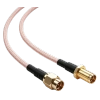
Why RF Cables Are Different From Standard Wiring
A standard wire just needs to carry current from A to B. An RF coaxial cable has to preserve a signal's frequency characteristics across its length, which means controlling three things simultaneously:
- Impedance — nearly all RF systems are built around 50Ω (some video/broadcast systems use 75Ω). Any mismatch along the path reflects signal back toward the source instead of letting it pass, which shows up as insertion loss and standing waves.
- Shielding — the outer conductor and jacket block external electromagnetic interference from corrupting the signal, and prevent the cable itself from radiating noise into nearby components.
- Insertion loss — every connector, cable length, and bend adds attenuation. At higher frequencies, even small design choices (connector quality, cable diameter, bend radius) start to matter.
This is why RF assemblies are specified by connector family, cable type, and length together — not treated as generic wiring.
Choosing the Right RF Connector
NextPCB supports the connector families most commonly specified for RF work:
| Connector | Typical Size | Common Use |
|---|---|---|
| SMA | Medium, threaded | Wi-Fi/cellular antennas, test equipment, general RF up to several GHz |
| SMB | Small, snap-on | Space-constrained boards needing quick-connect/disconnect |
| SMC | Small, threaded | Similar to SMB but with a more secure threaded connection |
| BNC | Larger, bayonet-lock | Test & measurement, video, quick-connect applications |
| MCX | Very small, snap-on | Compact devices, GPS modules, internal board connections |
| MMCX | Ultra-small, snap-on | Extremely space-constrained designs — wearables, small IoT modules |
As a rule of thumb: threaded connectors (SMA, SMC) give a more vibration-resistant connection; snap-on connectors (SMB, MCX, MMCX) are faster to mate and better suited to tight enclosures where a wrench or fingers can't easily reach a threaded nut.
Common Mistakes to Avoid
Mismatched impedance across the assembly. Mixing a 50Ω cable with a connector or antenna spec'd for 75Ω (or vice versa) introduces reflection loss that's hard to diagnose after the fact. Confirm impedance end-to-end, not just at the cable.
Ignoring minimum bend radius. RF coaxial cable has a minimum bend radius before the internal dielectric and shield geometry start to degrade — routing it too tightly inside an enclosure silently increases loss.
Underspecifying connector torque/retention. In products that see vibration or repeated handling (industrial equipment, vehicles, portable devices), a snap-on connector chosen purely for size can work loose over time. Threaded connectors are often the safer choice in these environments.
Treating RF cable length as an afterthought. Every extra centimeter adds attenuation, especially at higher frequencies. Route and measure early rather than adding length "to be safe."
Where RF Coaxial Assemblies Are Used
- Wi-Fi and cellular antenna connections in consumer and industrial devices
- GPS and GNSS receiver modules
- IoT and LoRa radio modules
- RF test and measurement setups
- Telecom and networking equipment
If your RF antenna or module lives outdoors or in a sealed enclosure, also see our guide to waterproof cable assemblies for IP-rated sealing options.
Frequently Asked Questions
What's the actual difference between SMA and SMB connectors?
SMA uses a threaded coupling nut, which gives a mechanically secure, vibration-resistant connection but takes longer to mate and unmate. SMB uses a snap-on interface that connects and disconnects quickly, which suits compact or frequently-serviced equipment, but is generally less secure under vibration than a threaded connection. Both are common 50Ω connector families; the right choice depends on how the connection will be handled in the field, not just on size.
Does the connector family limit the frequency my cable can handle?
Yes, each connector family has a general frequency ceiling based on its mechanical design — SMA typically covers into the double-digit GHz range, while smaller connectors like MCX and MMCX are usually specified for lower GHz ranges. Actual performance always depends on the specific connector, cable, and termination used, so the datasheet for your chosen parts should be checked against your application's frequency before finalizing a design.
Can I use a snap-on connector like MCX in a product that vibrates a lot?
It's possible, but threaded connectors are generally the safer choice for high-vibration environments (industrial equipment, vehicles, portable devices carried and dropped) because a snap-on connection can work loose over repeated vibration and handling that a threaded coupling nut resists.
Why does my RF connection lose signal even though the cable looks fine?
Signal loss in an otherwise intact-looking cable is often caused by an impedance mismatch somewhere in the path (connector, cable, or antenna not all matched to the same 50Ω or 75Ω system), a bend radius tighter than the cable's rated minimum, or a loose/under-torqued connector — none of which are visible from the outside.
Do I need a different RF cable assembly for outdoor antenna installations?
Often yes — outdoor RF connections typically need IP-rated sealing at the connector and cable-to-connector transition in addition to the standard RF specification (impedance, connector family, shielding). See our waterproof cable assembly guide for how sealing ratings are selected.
Get a Custom RF Coaxial Assembly Quote
NextPCB builds RF coaxial cable assemblies across the SMA, SMB, SMC, BNC, MCX, and MMCX connector families, from a single prototype to full production runs, with connector mate verification against your BOM before production starts.
Confident in your connector family and impedance? Configure your RF cable assembly →
Not 100% sure SMA vs. SMB vs. MCX is the right call, or worried about impedance matching? That's a common question at this stage — send our team your frequency, connector, and environment details and they'll confirm the right family before you commit to a quote.
Need it built alongside your board? RF cable termination can be integrated directly into a turnkey PCBA order, reducing post-assembly work on your end. See the full Cable Assembly Services page for capability details, or browse the NextPCB homepage for our full range of services.