NextPCB Capabilities
 PCB Assembly
 Layer Buildup
 SMD-Stencils
 PCB Design-Aid & Layout
 Mechanics
 Quality
 Drills & Throughplating
 Factory & Certificate



The Problem Isn't Always You
You upload your Gerber files to JLCPCB, the progress bar creeps to 92%, and then — nothing. Or the preview loads but one layer looks wrong, or the viewer flags a file as invalid when every other tool opens it fine. If you've hit this right before a deadline, you already know how frustrating it is.
You're not imagining it. Search any PCB design forum and you'll find years of engineers running into the same wall: viewers that get stuck loading, silkscreen that renders incorrectly, or board outlines that get rejected outright — sometimes on files that render perfectly everywhere else. This isn't a sign you did something wrong. It's a sign the problem is common enough to be worth understanding before you burn another afternoon on it.
Common Causes Engineers Have Actually Found
Based on patterns reported across KiCad, EasyEDA, and hardware forums, a handful of causes come up again and again.
Extended X2 format / aperture macro conflicts. Gerber has two main generations: the older RS-274X format and the newer Gerber X2, which adds structured metadata like layer function, net names, and aperture attributes. Not every viewer parses X2's extended attributes the same way, and some engineers have found that unchecking "Use extended X2 format" or disabling aperture macros during export resolves a viewer that otherwise won't load. If your CAD tool defaults to X2, a plain RS-274X export is worth testing as a quick diagnostic.
Board outline (edge_cuts) issues. A viewer needs a clearly defined board outline to know what it's even looking at. If your outline layer uses an unexpected file naming convention, lives on the wrong layer, or contains gaps or overlapping segments, some viewers reject the whole file rather than render a partial board. This is one of the more common "file won't load at all" causes.
EasyEDA's export path. Because EasyEDA, JLCPCB, and LCSC share an ecosystem, you'd expect export-to-view to be seamless — but engineers exporting Gerbers from EasyEDA have reported cases where dimension fields stay empty or the viewer link does nothing, even though the same files open cleanly in independent tools. When the export and the viewer belong to different systems that don't always agree on interpretation, gaps like this can show up.
Known viewer bugs vs. real file problems. Not every rendering glitch means your design is broken. Some issues — like silkscreen appearing distorted in preview — are acknowledged viewer-side quirks that don't reflect the actual manufactured board. The practical way to tell the difference: open the same files in a second, independent viewer. If two unrelated tools render it the same way, trust that. If only one tool disagrees, the odds favor a viewer quirk over a file error.
How to Troubleshoot Before You Panic
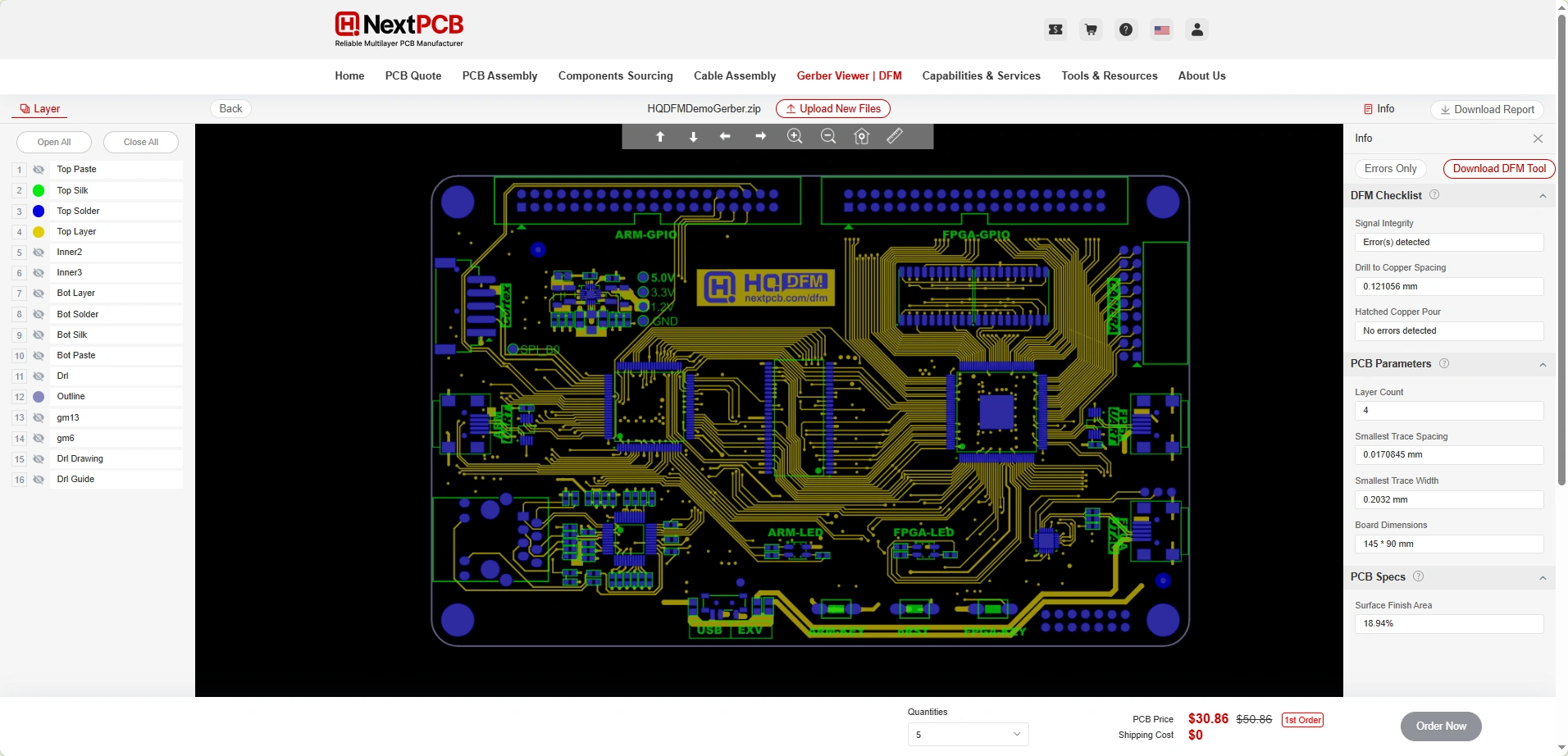
Before you start second-guessing your layout, work through this quick checklist:
- Cross-check in an independent viewer. Don't just retry the same tool — open your files somewhere unrelated (KiCad's own Gerber viewer, or another manufacturer's tool) to see whether the problem is file-specific or viewer-specific.
- Check your X2 / aperture macro export settings. Try a plain RS-274X export if X2 is giving you trouble.
- Verify your board outline file. Confirm it's named correctly, lives on its own layer, and forms a single closed shape with no gaps.
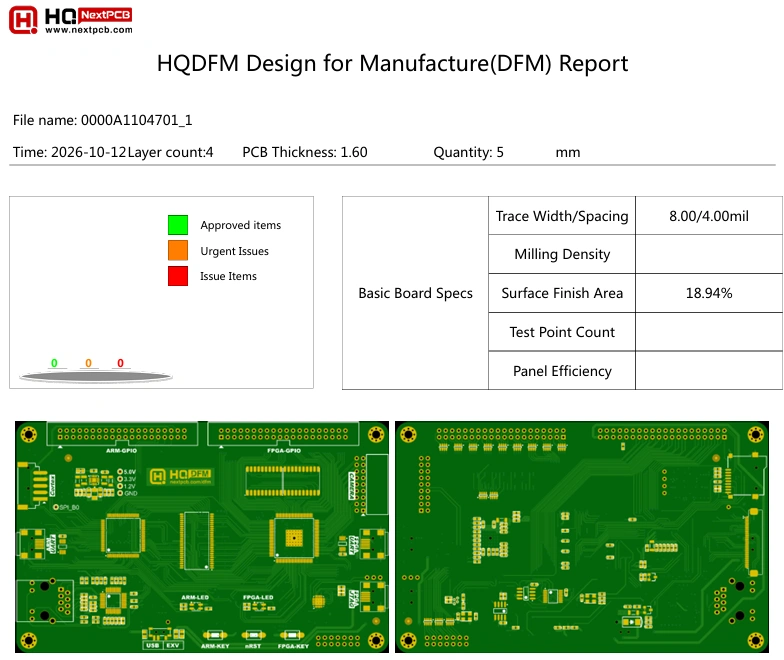
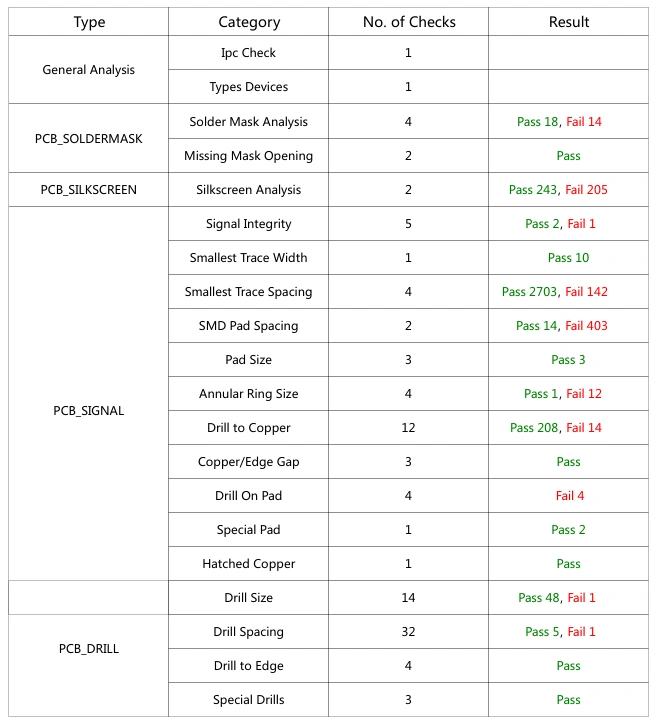
- Check the DFM report, not just the visual preview. A DFM check validates actual manufacturability — trace width, clearance, drill-to-copper — independent of how the viewer happens to render pixels on screen.
A Gerber Viewer That Doesn't Depend on One Manufacturer's Parser
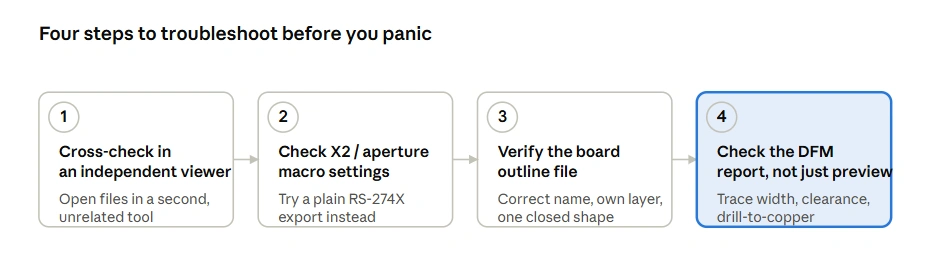
One way to sidestep all of this: check your files with a viewer that isn't tied to a single manufacturer's upload pipeline before you ever get to checkout. NextPCB Free Online Gerber Viewer accepts standard Gerber RS-274X and X2 files exported from any EDA tool — KiCad, Altium, EasyEDA, Eagle — and renders them independently of where you eventually place your order.
It's also built around more than just a visual preview. Alongside the rendered layers, it runs a full DFM analysis across 20+ categories and lets you download a complete DFM report, so you're not relying on a preview image to tell you whether a design is manufacturable. If you want a broader look at how different Gerber viewers compare on DFM depth and format support, see our full Gerber viewer comparison guide.
Try the NextPCB Gerber Viewer — no login required.
FAQ
Why does my JLCPCB Gerber viewer get stuck loading?
Stalled uploads are most often linked to board outline file issues or X2 format/aperture macro settings the viewer can't parse. Try a plain RS-274X export and double-check your edge_cuts layer naming.
Is it safe to order if the Gerber preview looks wrong but the DFM check passes?
Often yes — some rendering issues are known viewer-side bugs, not real design problems. Confirm by viewing the same files in a second, independent viewer before you commit to an order.
Can I use a different Gerber viewer before ordering from any manufacturer?
Yes. Standard Gerber files aren't locked to one manufacturer's tools — any viewer that supports RS-274X/X2 can open them, regardless of where you ultimately order your boards.
Does NextPCB's Gerber viewer work with files exported from EasyEDA, Altium, or KiCad?
Yes. It accepts standard Gerber RS-274X/X2 output from any EDA software, not just one ecosystem's export format.
Conclusion
Most Gerber viewer failures have a specific, identifiable cause — an export setting, a file-naming quirk, or a known rendering bug — rather than a flaw in your design. The more reliable workflow is to not depend on a single viewer's judgment: cross-check with an independent tool, and lean on an actual DFM report rather than a preview image when you need to be sure a board is ready to manufacture.