
 NextPCB Capabilities
Printed Circuit Boards
NextPCB Capabilities
Printed Circuit Boards
 PCB Assembly
 Layer Buildup
 SMD-Stencils
 PCB Design-Aid & Layout
 Mechanics
 Quality
 Drills & Throughplating
 Factory & Certificate
 PCB Assembly Factory Show
Certificate
PCB Assembly Factory Show
Certificate

Support Team
Feedback:
support@nextpcb.com


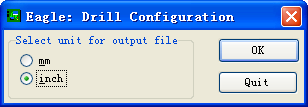
1. Run the "run drilling" command first, then select the "inch" item from the pop-up "Drill Configuration" dialog box, and then click the "OK" button to generate the corresponding drilling configuration file.
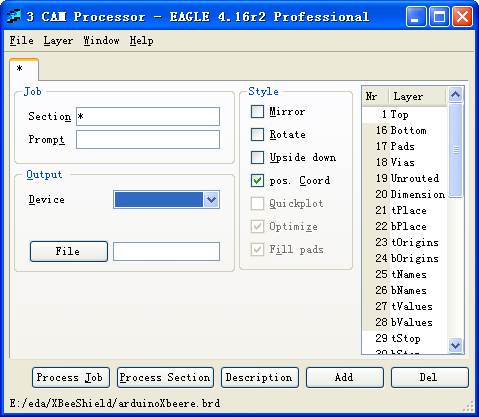
2. Then open the .brd file and select the "CAM Processor" command from the File menu to open the "CAM Processor" dialog.
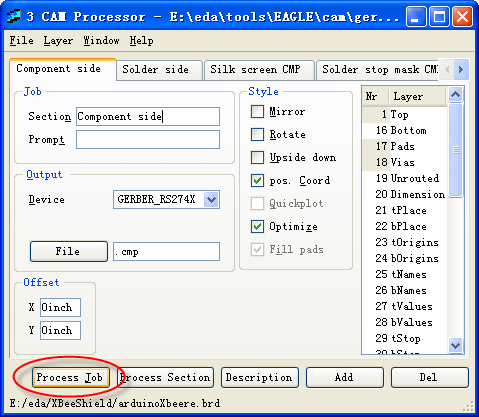
3. In the "CAM Processor" dialog box, select the "File" -> "Open" -> "Job..." command, open the "Open CAM Job" dialog box, select "gerb274x.cam" and click the "Open" button, after loading it, click the "Process Job" command to generate the corresponding Gerber file.
4. In the "CAM Processor" dialog box, select the "File" -> "Open" -> "Job..." command, open the "Open CAM Job" dialog box, select "excellon.cam" and click "Open" button, after loading it, click the "Process Job" command to generate the corresponding drilling file.
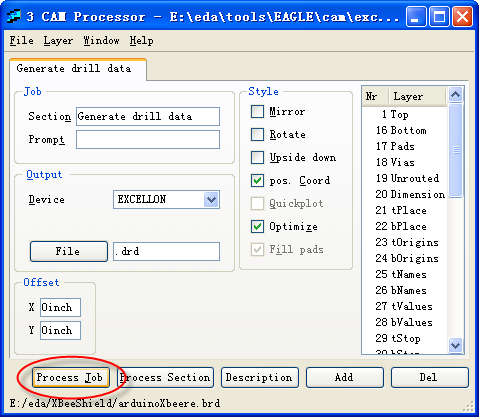
After completing the above steps, some other files will be generated under the directory where your .brd file is located. These are the Gerber files that can be sent to the board.
Still, need help? Contact Us: support@nextpcb.com
Need a PCB or PCBA quote? Quote now





