NextPCB Capabilities
Printed Circuit Boards
NextPCB Capabilities
Printed Circuit Boards
 PCB Assembly
 Layer Buildup
 SMD-Stencils
 PCB Design-Aid & Layout
 Mechanics
 Quality
 Drills & Throughplating
 Factory & Certificate
 PCB Assembly Factory Show
Certificate
PCB Assembly Factory Show
Certificate

Support Team
Feedback:
support@nextpcb.com


Starting out with your PCB design journey and can’t decide? Or maybe you are considering migrating tools. Dive into the Altium vs KiCad wars with us as we compare everything from features, ease of use, company structure and stability to help you decide.

Whether you are a beginner to PCB design building your skills, a freelance engineer looking to make the switch, or an enterprise balancing costs against features, we cover the pros and cons of each tool and how it may affect you.
| Category | KiCad | Altium |
|---|---|---|
| Software Type | Free, open-source, cross-platform | Premium, proprietary, professional-grade |
| Core Features | Schematic capture, PCB layout, simulation | High-speed design, rigid-flex, MCAD collaboration, Altium 365 |
| Audience | Popular with hobbyists, educators, start-ups | Targets enterprises and professional engineers |
| Support |
|
|
| PCB/Product Types | Rigid, some flex, simple high-speed | Rigid, flex, rigid-flex, 3D MID, high-speed, harnesses, embedded components |
| Online/Cloud Features | GitHub libraries |
|
KiCad is a free, open-source EDA (Electronics Design Automation) tool for schematic capture and PCB layout designed for professional users. Developed and maintained by a small team of lead developers and a global community, KiCad is a prime example of what open-source values, community support and user-oriented development can achieve, resulting in a professional-grade tool that can compete with commercial alternatives without the high paywall.
Altium Designer is a commercial, industry-standard PCB design suite used widely in consumer electronics, aerospace, high-speed applications. In addition to schematic capture and layout, Altium offers advanced tools and unified workflows with cloud integration in the form of Altium 365.
As we can see from the summary, Altium and KiCad are very different beasts with very different ethe, and you may be wondering why we are even comparing a higher-end PCB design tool with one that is essentially freeware. Perhaps it is not even a fair comparison. Yet companies like CERN use it over other professional tools, and more companies are increasingly adopting it in a professional setting.
KiCad vs Altium. A four-year-old Reddit discussion or more relevant than ever?
Both Altium and KiCad are professional tools for creating electronics designs, and the comparisons go back. 4 years ago, this popular Reddit thread exploded with the views and opinions of users on both sides, and today, it is still a hot topic that drives heated debate.
The landscape then was very different. At that time, we would be comparing KiCad 5 to Altium 20. Today, we have KiCad 9 and Altium 25. Both have evolved drastically over that time by raising their respective bars. Altium covers more advanced and specialist designs, whereas KiCad closes the gap by covering more semi-complex designs.
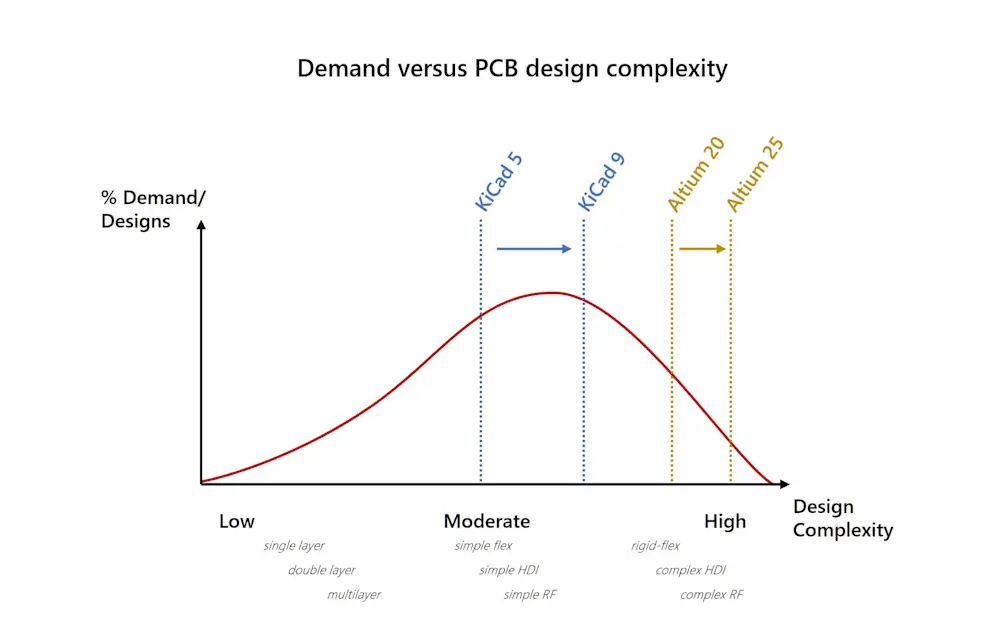
Very rough diagram to illustrate a point, by no means based on any factual data
In reality, the needs of individuals and industries have not changed as drastically. Not all electronics need to go into the HDI 3 or high-speed domain, and we still need simple electronics. What that means is KiCad is able to satisfy the needs of a lot more lower-end designs (for free, albeit with a little more work), while Altium focuses on covering more niche areas and improving efficiency.
At the same time, Altium's licensing structure changed, resulting in increased costs for the large majority of users. Many were forced to reevaluate the benefits against the costs, which also made free alternatives like KiCad more attractive.
Altium Designer justifies the extra cost with a plethora of cloud-based collaboration tools, integrations and smart workflows to boost efficiency by bringing in all the tools a product development team could need within the Altium ecosystem. The efficiency savings are a strong incentive for those considering migrating from KiCad, which has close to zero native cloud support.
Long-term Altium users may laugh or even be offended by the idea of comparing Altium versus KiCad, especially in certain fields such as high-speed design, but in many respects, the argument is meaningless. There is no best PCB tool, only the best PCB tool for you, your business, organization, industry, etc. and price point. As a colleague once said, "If I was made of money, I would use Altium too." Unfortunately, most of us are not, however, you should also factor in the efficiency savings and maximizing revenue in a fast-paced environment. Ultimately, it boils down to the question - do Altium's additional efficiency savings and features justify the high cost?
Altium is certainly feeling the pressure. Just take a look at this rather humorous one-sided comparison page:
In the following section, we will go through various aspects that go into the decision-making process, from cost and features to flexibility.
For more context, let's look at the actual fees we will be comparing:
Altium currently offers many plans on a subscription basis tailored to different user groups and regions. Subscription plans last at least one year but can be billed monthly or annually. Navigating the various options can be a challenge, so here's a quick summary of the single-site options. Prices in USD are for reference only and may vary with region:
* A single site license grants you access to Altium Designer within one specific location geographically, continental allows use within the same continent ($8,242 a year per seat, minimum of 3 seats), and global can be used anywhere in the world ($10,990 per year per seat, minimum of 5 seats).
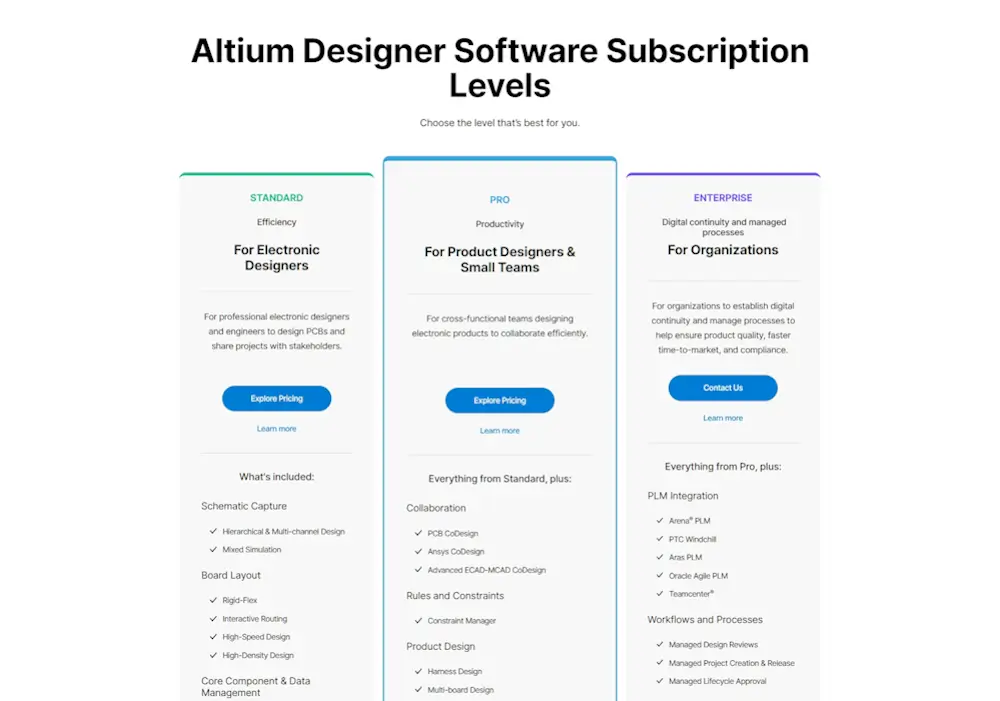
Altium Designer subscription levels
As of the time of writing, you can still purchase a traditional perpetual license for Altium CircuitStudio, Altium's entry-level software for individuals and small businesses, at a substantially lower price. At a glance, CircuitStudio's offerings are more akin to KiCad's; for example, no cloud support, basic libraries and limited support for high-speed and flex/rigid-flex designs.
Altium also offers CircuitMaker, a free PCB design tool aimed at hobbyists and early learners. All projects must be shared publicly, and designs are limited to 2 circuit layers, much too restrictive for many maker projects, let alone commercial applications.
Yes, KiCad is as free as the word free can be. There is no signing up and getting spam e-mails, there's no trial or lite version with a paid full version, it's not loaded with ads and there are no geographical restrictions. All the KiCad code is available online for anyone to see.
This is all held together by KiCad's founding core values, emphasizing KiCad's free and open-source nature. KiCad was made by engineers for engineers, by the community for the community, not for shareholders. KiCad developers own no part of KiCad or any of its users' data and strongly oppose the SAAS (software as a service) model that is being thoroughly exploited by Altium. These values, in addition to it's zero-cost offerings, mean KiCad can cement its place on the other end of the spectrum as well as set itself apart from other free software like Eagle (which was ultimately purchased and implemented into Fusion 365), another subscription-based EDA suite. All KiCad asks for is an optional donation to continue the development of KiCad.
Altium excels with advanced, industry compliant designs including high-speed digital and RF designs, HDI and flex, rigid-flex and embedded designs. Unless your designs are very simple, any one of these PCB requirements is enough to justify choosing Altium over KiCad alone.
High Speed PCB Designs: Altium's support for high-speed designs include tailored high-speed design constraints, in-depth tuning and interactive routing, a signal integrity simulator, the xSignal feature to manage high-speed signals, an advanced layer stack manager with impedance profiles and support for back drilled vias and much more, making it the clear winner for high-speed designs. KiCad's high-speed support is very limited and additional workarounds and tools are required.
Altium's approach to high-speed design considers the entire design workflow and tailors each aspect, giving designers all the necessary tools to cater to high-speed designs within Altium's ecosystem.
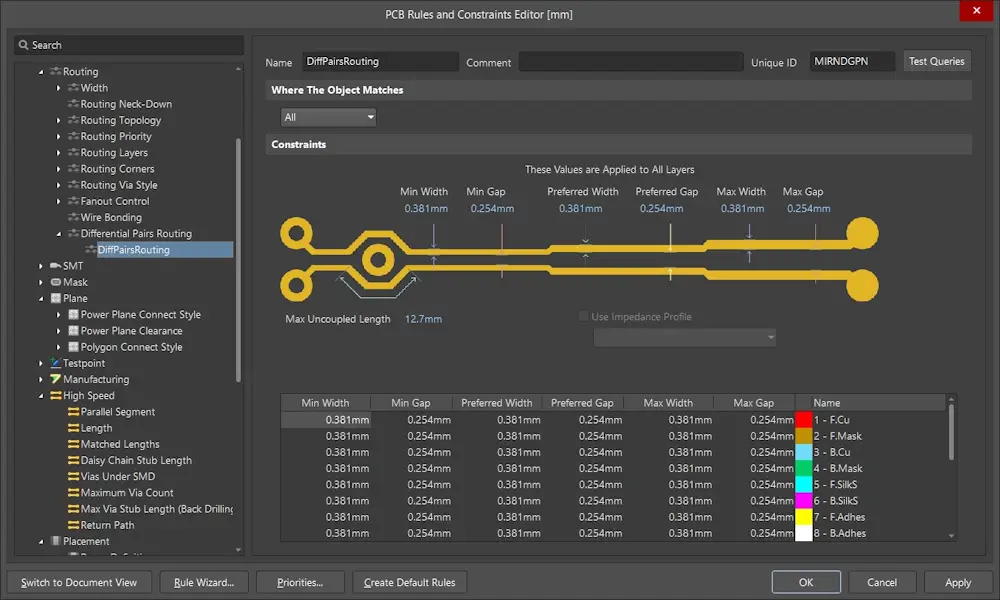
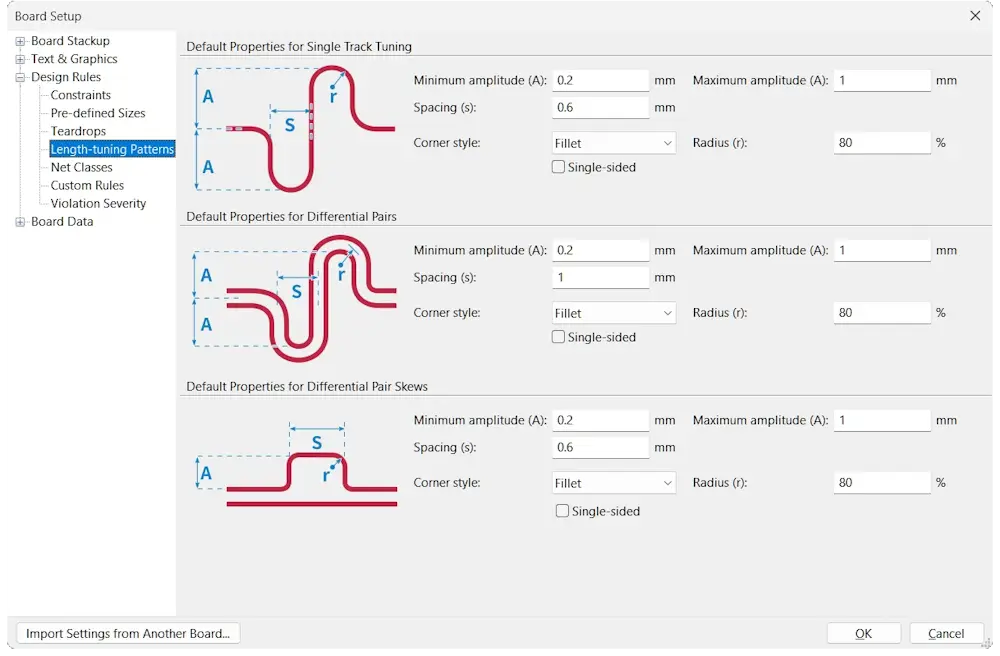
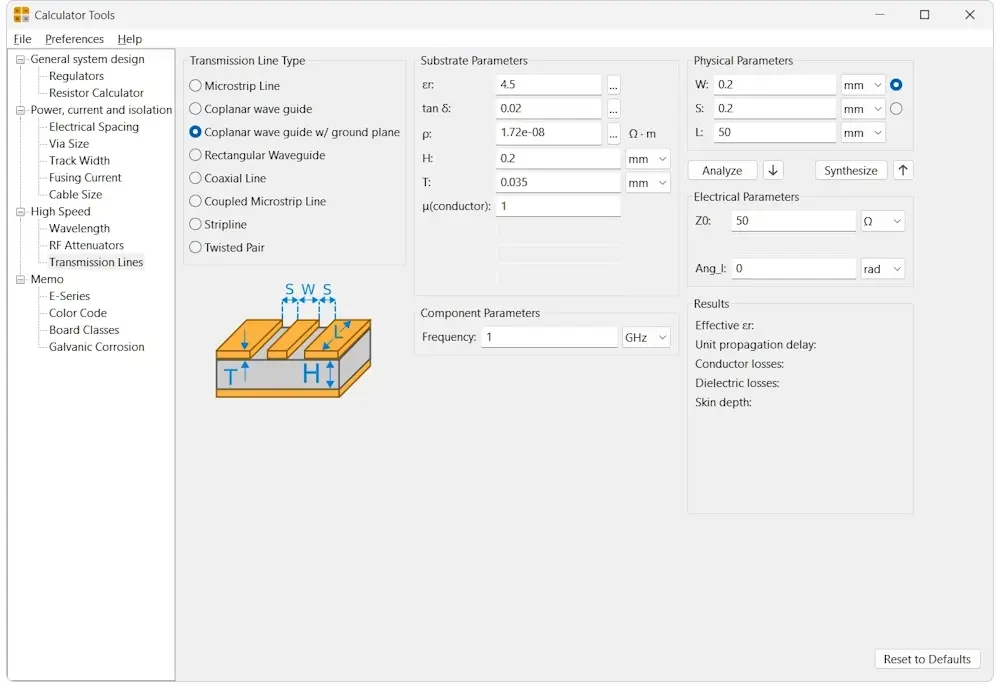
Built-in length tuning capabilities, a primitive stack-up builder and bundled high-speed calculators are about as far as support for high speed design goes in KiCad.
HDI: Similarly, Altium's toolset for high-speed designs also support high-density interconnect (HDI) designs such as support for various specialized via types, custom PCB structures, impedance control tools and routing tools and design rules specific to the needs of HDI designs. KiCad, on the other hand has very basic support for microvias and blind/buried vias.
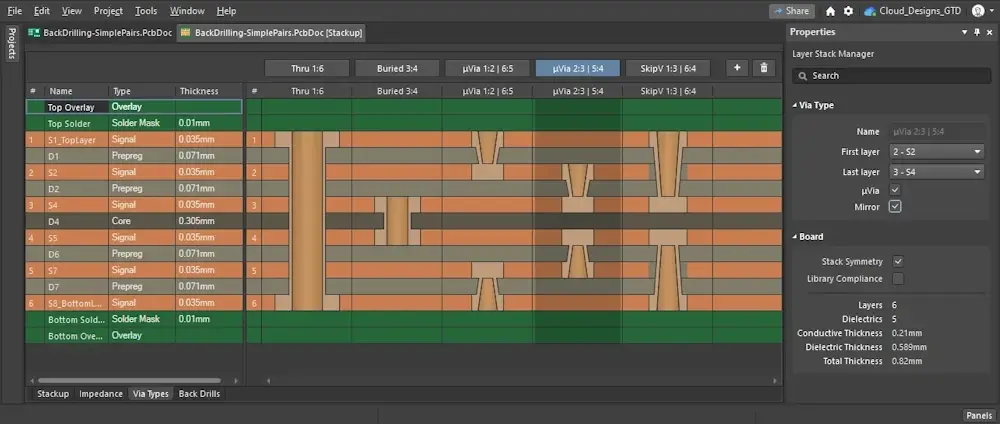
Altium's layer stack manager with various via types. Image courtesy of Altium
Flex and Rigid-flex: Altium Designer provides specialized tools and workflows to streamline flex and rigid-flex PCB design, including dynamic stack-up management for flex and rigid sections, 3D bend simulation, customizes design rules and annotators for fabrication drawings, essential for building industrial designs. You also get nice tools like a 3D movie maker, great for showing off in product design of concept proposals.

Image courtesy of Altium
In KiCad, designing simple flex PCB cables is very similar to designing rigid PCBs, since the outputs look almost identifcal and stiffeners can added in general purpose layers. For rigid-flex designs, designers who know what they are doing could pull off manually creating the necessary fabrication information and visualize it using third-party tools, however, it is a labor intensive and mistake-prone process.

Image courtesy of maui
Altium also has support for designing boards with embedded components and advanced electromechanical support for integrating enclosures, wire harnesses and other mechanical parts. If any one of these product types fall within your main requirements then that alone should be enough to convince you to go for Altium Designer over KiCad. If not, then Altium could be overkill for your needs. Let's compare other features that go into making a great EDA tool.
Notice that KiCad describes itself as an EDA tool, whereas Altium Designers calls itself an electronics design environment, and Altium 365 is a suite of tools. Altium's premium package encompasses a lot features and integration to bring together a complete workspace, not just for electronics engineers but everyone from the product development team to mechanical engineers to quality assurance.
Libraries: Altium's built-in library is actually nothing to shout about, however, with the Octopart integration, it is not needed. KiCad's base library is quite extensive, however it lacks part number integration. Third-party KiCad libraries are plentiful however, with many partners and manufacturers specifically creating libraries for KiCad. Major footprint databases such as SnapEDA and Ultra Librarian also support the EDA tool.
Component Management: One of Altium's major efficiency boosters over KiCad is it's ActiveBOM component management editor which integrates various supply chain resources such as the Octopart electronic component seach engine - a huge database of over 95 million parts and 1.3 million component CAD models and component lifecycle data from IHS Markit. This means users have access to live part data including pricing, availability and lifecycle data for hundreds and thousands of components directly from within Altium. At a glance, you can see which parts in the BOM are nearing their end-of-life or have a new revision, and get pricing and stock information from your favorite suppliers, saving engineers potentially days of tedious work. This can be vital for keeping designs up-to-date and mitigating various supply chain risks in a commercial setting.
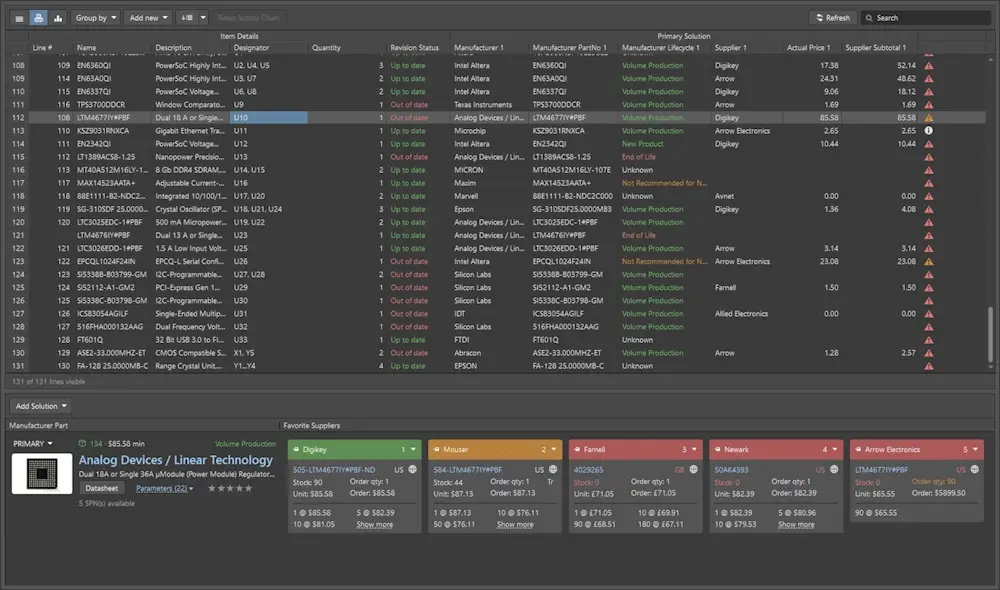
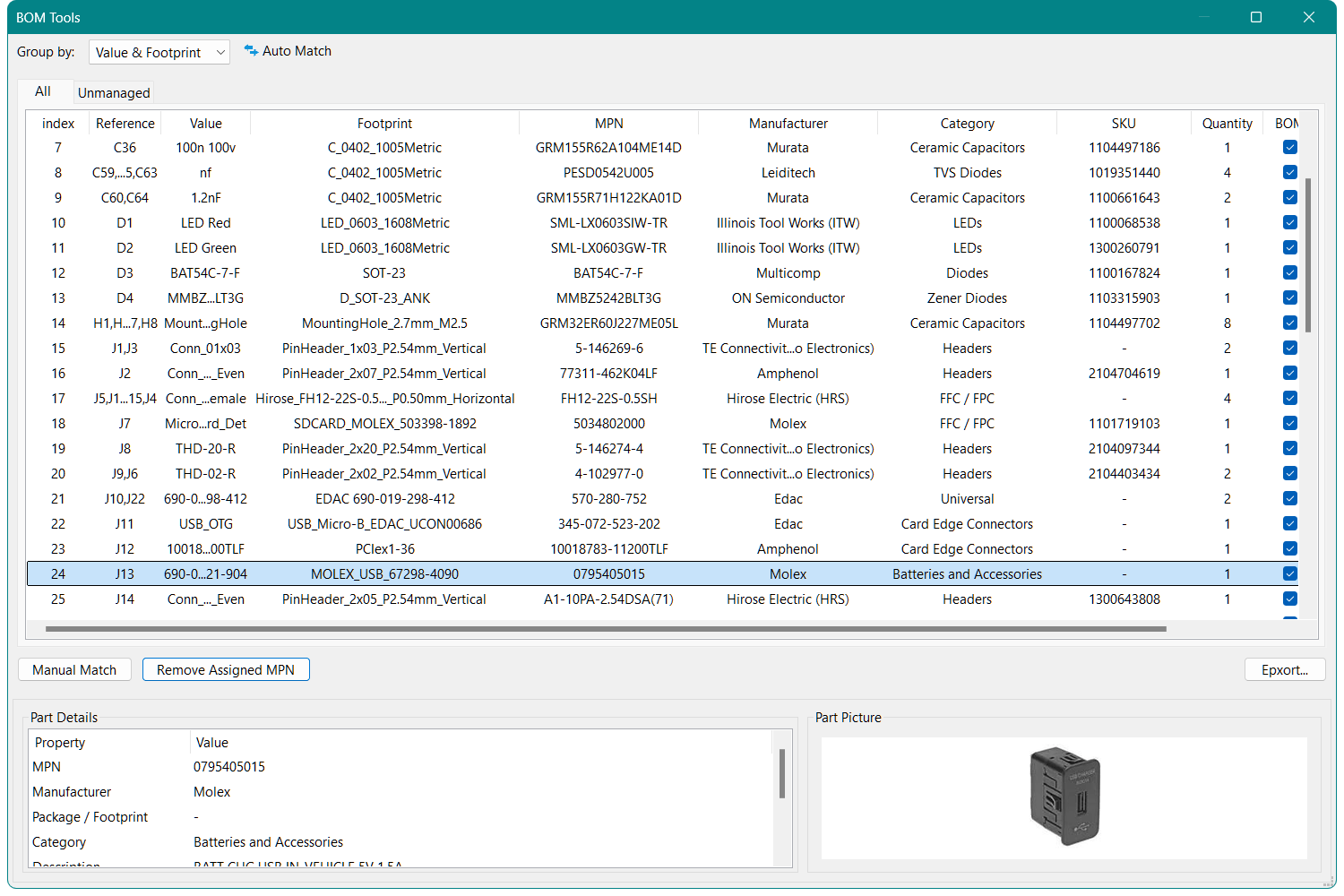
KiCad, on the other hand has nothing like this and relies on traditional manual checking. Some plugins give KiCad similar integration like NextPCB's Auto BOM Parts matching tool, but the coverage and depth simply cannot compare with Altium's ActiveBOM. And since such database searches and integration don't come cheap, it is highly unlikely that the base KiCad will ever implement such a feature.
Supported 3D Model File Types: Altium Designer supports STEP, SOLIDWORKS and Parasolid models whereas KiCad supports STEP and VRML 3D model files.
Built-in 3D Models: Altium has around 8000+ 3D models built-into it's library models whereas KiCad has 7000+ independant 3D models in STEP and WRL format.
3D Viewer: Altium's 3D viewer renders in real time and has PCB 3D inference checking for making sure those clearances are being respected and even has a 3D movie editor. KiCad's OpenGL-based 3D viewer is much simpler and is primarily used to visualize the PCB and components in 3D space. But it doesn't look bad and is quite aesthetically pleasing especially with Raytracing enabled, and changes to the layout are updated with very little lag.
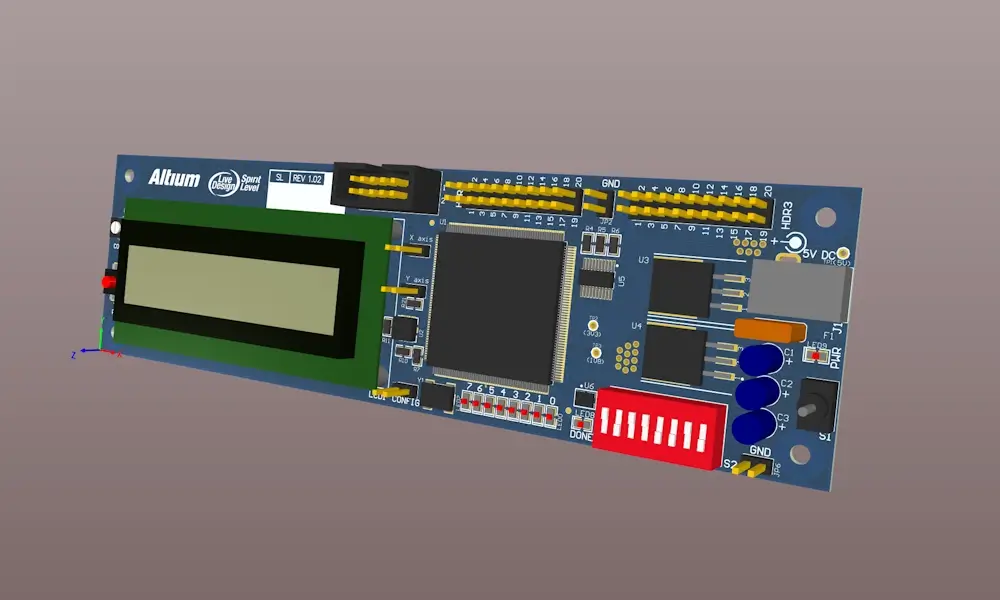
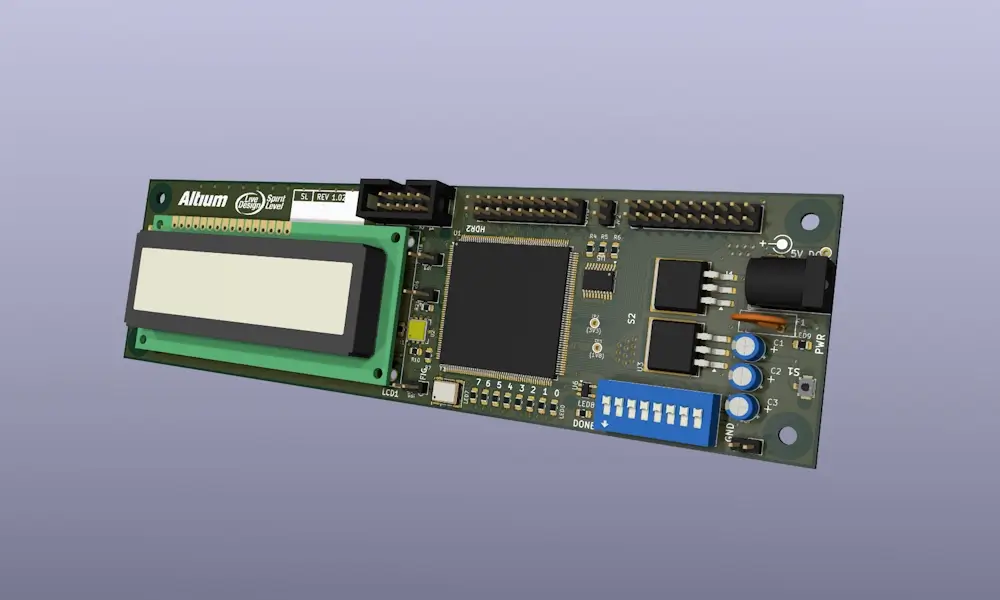
Comparison of the 3D viewers of Altium Designer (top) and KiCad (bottom, raytracing applied) using built-in 3D models where possible. SpiritLevel design by natecollette
Simulation Tools: Both Altium and KiCad support SPICE simulation. Altium also has a signal integrity simulator for high-speed designs.
ERC/DRC: Altium provides highly customizable and in-depth design rule constraints options. Altium introduced a new Constraints manager that is available with Pro subscriptions in addition to the legacy Design Rules Manager that is similar to KiCad's. Though users on a standard subscription won't be able to use the constraint manager.
In KiCad, design rules are limited to set of rules that apply globally, but can be more specific with the use of custom design rules.

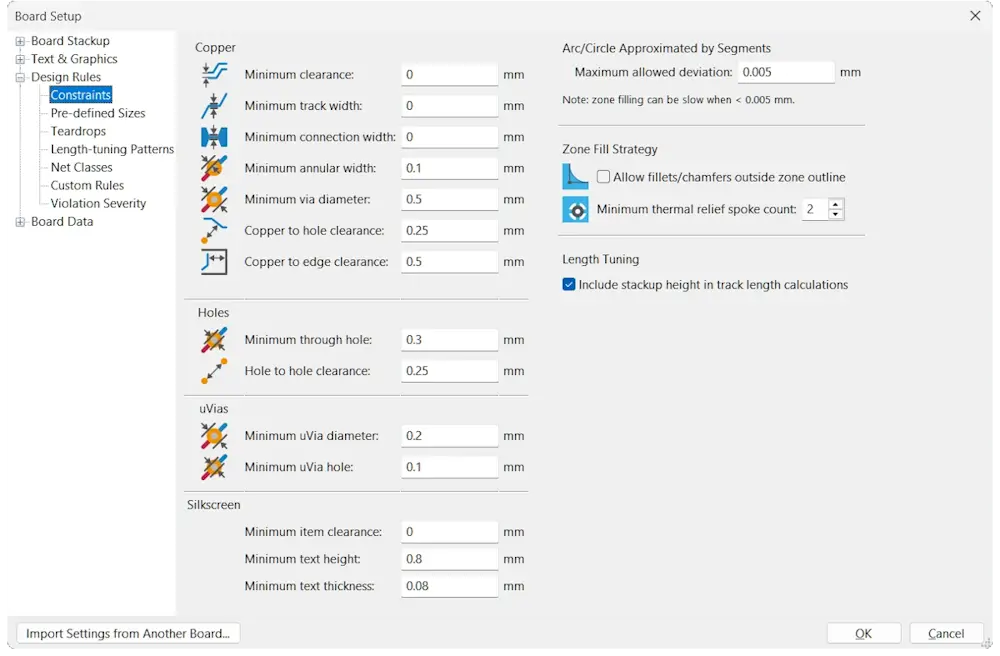
Altium Designer Contraints Manager versus KiCad's Design Rules interfaces
Customization:
KiCad's open-source nature makes it incredibly flexible, allowing anyone with the appropriate knowledge to customize KiCad for a specific purpose, whether it be a KiCad plug-in, an interface with third-party software, or a completely customized build of KiCad. For example, NextPCB customized a version to bypass many of the system and firewall headaches encountered by Chinese users, helping to expand the Asian KiCad user base.
This means you can develop applications that you need now instead of waiting for the developer to realize the demand, evaluate if it is worth doing and how, and then implement it. Even then, it may not satisfy all your needs. For enterprises, KiCad also has a dedicated service corporation that can help you customize KiCad if you do not have the capabilities and resources to do it yourself. Some of these niche features may even make it back into the final build, further expanding KiCad's capabilities for everyone.
While Altium Designer opens doors with innovative features and tools, it closes others with it's restrictive plans, high pay wall and limitations. Altium's products are proprietary, so if you need a specific feature that cannot be fulfilled via scripting or external software, you are in Altium's hands.
Plugins/Scripting Support:
Altium Designer supports comprehensive scripting features plans supports Python scripting and plug-in support, and has a mature SDK in C#/C++/Delphi
Altium Designer offers a robust scripting environment with support for DelphiScript, JavaScript, Python (via COM API), and VBScript, allowing customization of many areas of the Altium ecosystem including design rule checks, footprint generation, custom documentation and manufacturing outputs. There is even an Altium 365 API for cloud connectivity. Support is mature and fully documented with SDK's for Delphi, C++ and C#.
KiCad, being open sourced, relies on fellow open source tools such as Python to integrate scripting. KiCad supports python plugins, C++ modules and GUI scripting.
As of KiCad 9, KiCad uses the KiCad IPC API to communicate with third-party applications and plugins, as opposed to the SWIG-based Python bindings of previous versions which is limited to the PCB editor and the Python language. Development is still early and not all older plugins can be ported but the hope is to support other parts of KiCad in addition to the PCB editor, paving the way for more advanced and creative ways to customize KiCad.
Cross-Platform Capability:
An expansion of KiCad's democratization of PCB design software is its cross-platform promise. KiCad's full builds will always be compatible across Windows, MacOS and Linux systems, unlike Altium, which only supports Windows.
Altium subscribers are rewarded with new product releases and substantial updates, with a major annual release every year. Recent additions include harness design, 3D MID design, Altium 365 codesign features and unified workflows alongside consistant updates and improvements to core features.
With new features, long-time Altium users frequently voice frustration over the company’s tendency to push half-baked features prematurely. Many of these updates are marketed as substantial improvements to existing tools, only for users to find them buggy, incomplete, or rushed (see Constraints Manager vs. DRC or the Layer Stack Manager for example). Yet when faced with backlash Altium often backtracks, tweaks the implementation, and later rebrands these fixes as "new enhancements," effectively selling the same feature twice.
This cycle of release-now, fix-later has become a recurring theme, making users feel more like beta testers than paying customers. Rather than refining tools before launch, Altium seems to prioritize aggressive marketing, leaving core functionality unstable until patches (or full reversals) arrive.
KiCad, on the other hand, faces less pressure to release new features or make drastic changes. Take KiCad 9 for example, which largely focuses on user interface and quality of life improvements, addressing a backlog of small but important requests. The downside is that development is slow and new features are rare.
In fact, KiCad’s development philosophy gravitates away from radical changes in favor of stability and user-centric improvements. Satisfying an entire user base, paid or not, is always a significant challenge in itself. KiCad has to juggle requests from paying corporate customers, sponsors and individual users while preserving their fundamental values. But this transparent, user-facing and collaborative approach means KiCad can openly discuss proposals directly with users, test ideas and take advantage of community input, ensuring the solution resolves the needs of users.
As of the latest available data, Altium has over 800 employees in 11 locations globally with major offices in the United States, Europe, Australia and Asia, spanning engineering and R&D, sales, management and operations.
KiCad consists of a small group of 14 lead developers, 18 librarians and 6 packagers and a single technical writer - most of which work part-time on the project. You can see them all here. Oh, and a very large, passionate but unregulated community of users, sponsors and advocates. In addition to software development, Wayne, Seth and other members of the team also handle marketing, social media, forums, co-operations, and participate in events including numerous KiCad conferences (KiCon) every year.
Much of KiCad’s marketing and influence is organic, thanks to the help of bloggers, influencers, partners and fans spreading the word and producing content about new features and how to utilize them.
Altium, however, adopts an aggressive marketing style, employing various tactics to spread news of updates, competitor comparisons and persuasive campaigns to drive subscriptions.
Selecting the right PCB design software depends on your needs, budget, and scale of work.
See if you are eligible for a free annual academic license. Learn Altium while you have access, but also learn KiCad so you can include both in your resume.
Evaluate the features of Altium Designer you and your clientele need that are not available in KiCad. Learn both and make use of importers and conversion tools to dip between Altium and KiCad according to needs. Also, consider looking into the features of Altium CircuitStudio for KiCad like capabilities in an Altium environment, but at a fraction of the cost.
Balance the needs of your business and industry with those available in KiCad and Altium. What level of design complexity is required? How fast do you need to get new designs and re-spins out? What scales and certifications are needed? Some industries require strict compliance & documentation (aerospace, medical, automotive).
Evaluate the company's needs in terms of design complexity, number of layers, high-speed, rigid-flex, complying with industry standards etc. Weigh the advantages of collaborative features, supply chain integration, enterprise-level support, efficiency and scalability against licensing fees and the customization capabilities of KiCad.
The takeaway for individual users is to use KiCad until you need Altium, but being familiar with both is a smart long-term strategy. Remember, Altium offers a 14-day free trial and the onboarding tutorials will get you up to speed quickly, and KiCad will always be there when Altium is not.
From July 1st 2024, Altium is no longer offering perpetual licenses of Altium Designer in favor of a timed subscription based model. Altium informs users that this “will reduce your upfront costs when adding Altium Designer capacity and enable Altium to invest more predictably in product development.” You can still buy perpetual licenses for Altium CircuitStudio however, the mid-range tool which is similar to KiCad in terms of capabilties.
This news was released around the time of the Renesas takeover, which put a sour taste in many loyal users’ mouths speculation abound. It was a hard pill to swallow for many, with talk of being locked in, losing access to years of designs and impressing shareholders, not users.
Yes, there is a free 14-day trial period for evaluation for the full Altium Designer package.
Apart from CERN, many companies use KiCad in a professional setting including other open-source advocates such as Sparkfun, Adafruit, Olimex, as well as many crowdfunding and start-up companies.
KiCad is also increasingly being used to teach EE courses in educational institutions for its accessibility and beginner friendliness. It is also not unusual for companies to use KiCad for prototyping work before transitioning to Altium or other tools for mass production.
Companies may not be as open to mentioning they use KiCad for their designs compared to individual users as it could reflect badly in terms of compliance and allocation of resources.
Yes, KiCad can read Altium schematic and layout files directly in read-only format with support for Altium project files from KiCad 9.0.3 onwards. You can then convert the files to KiCad format with a few clicks. You can read the guide here.
Altium cannot directly read KiCad files, the different file formats and design structure mean the two are not entirely compatible. However, there is a KiCad Import Wizard extension for complete conversion. The complete guide is here.
Yes, KiCad 8 and onwards support symbol and footprint library import so you can bring your Altium libraries along. Read our guide here.
There are many ways in which Altium is better than KiCad in terms of features and functionality, but this comes behind a huge price wall. KiCad wins in terms of price (none), customization and accessibility.

Founded in 2011, NextPCB is a global leader in reliable, cost-effective PCB manufacturing and assembly. Serving customers in more than 166 countries and regions, we operate five advanced factories in China capable of HDI, high-layer-count, high-speed, rigid-flex, and rapid prototyping through to full-scale production. By combining automated manufacturing, digitalized workflows, and customer-centric support, we deliver the optimal balance of speed, quality, and affordability for hardware teams worldwide.

Still, need help? Contact Us: support@nextpcb.com
Need a PCB or PCBA quote? Quote now