
 NextPCB Capabilities
Printed Circuit Boards
NextPCB Capabilities
Printed Circuit Boards
 PCB Assembly
 Layer Buildup
 SMD-Stencils
 PCB Design-Aid & Layout
 Mechanics
 Quality
 Drills & Throughplating
 Factory & Certificate
 PCB Assembly Factory Show
Certificate
PCB Assembly Factory Show
Certificate

Support Team
Feedback:
support@nextpcb.com


It is 2 AM. You just finished routing a complex 8-layer high-speed board. Your eyes are bloodshot, but the deadline is tomorrow. You hit export, generate a dozen individual Gerber files, spit out an NC Drill file, zip them together, upload the package to your PCB fabricator's portal, and go to sleep—praying you won't wake up to an "On-Hold" email from a CAM engineer.
This routine has been the bedrock of the hardware industry for decades. The Gerber format is technically over 50 years old. In the software world, relying on 50-year-old data structures to build modern AI-driven infrastructure would be considered insane. Yet, in hardware, Gerber remains the undisputed heavyweight champ.
Meanwhile, "intelligent" formats like ODB++ and IPC-2581 promise to fix everything that is broken about Gerber.
This raises an important question: Do we still need Gerber files, or is it time for smarter formats such as ODB++ and IPC-2581?
For more than 30 years, Gerber files have been the universal language of PCB manufacturing. Almost every PCB designer, engineer, and manufacturer uses Gerber data to communicate board designs. But PCB designs have become increasingly complex. High-density interconnects (HDI), advanced packaging, rigid-flex circuits, and highly automated manufacturing processes now require much more information than traditional Gerber files were originally designed to provide.
In this article, we'll compare Gerber, ODB++, and IPC-2581, explain their strengths and weaknesses, and discuss which format makes the most sense for modern PCB production.
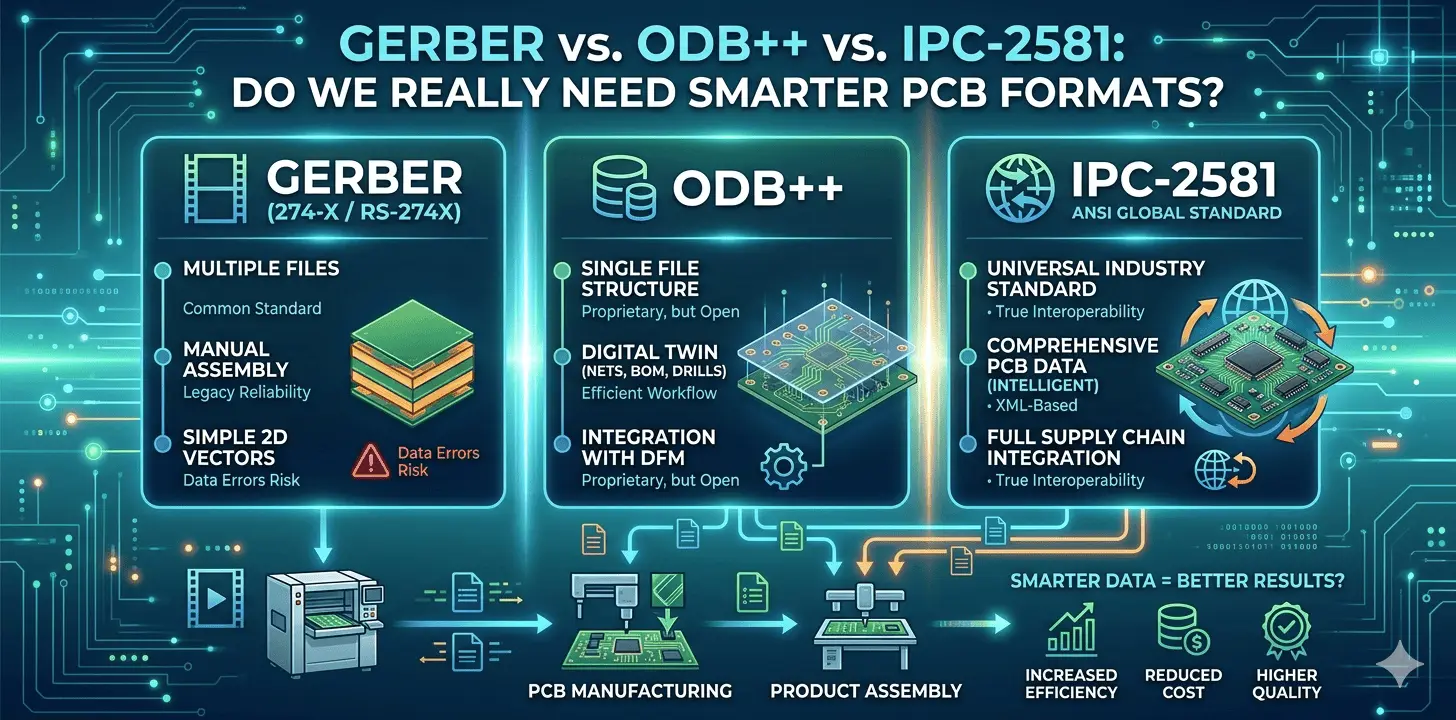
To understand why Gerber won't die, you have to understand what it is: it's just a digital photo-plotter language. When you export RS-274X or Gerber X2, your EDA software is essentially generating a series of 2D vector drawings. One file for the top copper, one for the solder mask, one for the silkscreen, and so on.
Gerber data has no inherent "intelligence." It knows that a line exists at specific coordinates, but it doesn't know that the line is a trace named USB_D_P. It doesn't know the difference between a via pad, a test point, or a component landing pad. Furthermore, your layer stackup order, drill data, and netlist are sent as completely separate files. Critical manufacturing data is often stored separately: drill files, netlists, stackup information, material specifications, assembly data, component placement files.
> Recommend reading: Gerber Files: What They Are, How to Create, View & Convert
Introduced by Valor (later acquired by Siemens), ODB++ was the industry's first major attempt to replace the messy ZIP archive of Gerbers with a single, unified database. Instead of 15 separate text files, ODB++ exports a single hierarchical file structure (usually compressed into a .tgz or .zip). This single container holds everything: copper layout, drill matrix, layer stackup, netlist, BOM, and component placement data.
True Netlist Awareness: Because the format understands electrical nets, the manufacturer can instantly verify your design against their manufacturing limitations without "guessing" your connectivity.
Improved Data Integrity: All manufacturing information resides in one package, reducing the risk of missing or mismatched files.
Better DFM Automation: Manufacturers can automatically perform Design Rule Checks , Design for Manufacturing (DFM), Design for Assembly (DFA), and testability analysis.
Faster Engineering Review: CAM engineers spend less time verifying design intent, drastically reducing engineering questions.
Despite its advantages, ODB++ adoption has not completely replaced Gerber. Reasons include proprietary origins (controlled by Siemens), limited support in some PCB design tools, learning curve for smaller teams, and legacy workflows built around Gerber. Many engineers still prefer Gerber because every supplier can process it immediately.
> Recommend reading: What is ODB++? A Complete Guide to the PCB Manufacturing Format
If ODB++ is the corporate giant, IPC-2581 is the open-source hero. Created by a consortium of industry leaders (including Cadence, Zuken, and many Tier-1 fabricators) under the IPC umbrella, it was designed to be a 100% neutral, open standard. Based on an XML structure, IPC-2581 compresses design, fabrication, assembly, and test data into a single .xml file. It does everything ODB++ does, but without a corporate logo attached to the format's ownership.
One File to Rule Them All: Covers the entire lifecycle—from layout to pick-and-place assembly line.
Bi-directional Data: Fabricators can easily send modifications or DFM changes back to the designer using the exact same format.
Truly Open: No corporate ownership, no licensing concerns, no vendor lock-in.
While growing incredibly fast in aerospace, defense, and automotive sectors, smaller, low-cost prototype factories have been slow to update their legacy CAM software to support IPC-2581 natively.
| Feature | Gerber (RS-274X / X2) | ODB++ | IPC-2581 |
|---|---|---|---|
| Open Standard | ✅ Yes | Partially (Siemens-controlled) | ✅ Yes |
| Data Structure | Split Files (separate layers, drills, netlists) | Single Database Archive | Single XML File |
| Artwork Data | ✅ Yes | ✅ Yes | ✅ Yes |
| Drill Data | Separate file | Included | Included |
| Netlist Awareness | ❌ None (X2 has basic labels) | Full Integration | Full Integration |
| Stackup Information | ❌ No (requires PDF) | ✅ Embedded | ✅ Embedded |
| Assembly Data | Separate files | ✅ Yes | ✅ Yes |
| DFM Automation | Limited | Strong | Strong |
| Industry Adoption | 100% Global | ~80% (High-end & Tier-1) | ~60% (Growing fast in high-reliability) |
| Ease of Use | Very Easy | Moderate | Moderate |
Modern PCB manufacturing is increasingly automated. Industry 4.0 is changing PCB production. Today's factories rely on software-driven processes for CAM preparation, DFM analysis, AOI programming, SMT programming, flying probe testing, ICT fixture generation, digital twins, MES integration, and real-time traceability. The more complete the incoming design data, the fewer manual interventions are required.
The answer isn't a blanket "yes" or "no." It depends entirely on what you are designing and where you are manufacturing it.
No. Gerber remains the most widely used PCB manufacturing format and will likely continue to be supported for many years. It's not going away anytime soon.
Technically, yes. IPC-2581 contains far more manufacturing intelligence and reduces the need for separate documentation. But "better" only matters if your manufacturer can accept it.
Absolutely. Many advanced PCB manufacturers and EMS providers rely heavily on ODB++ for automated engineering workflows. It remains a dominant force in high-end production.
ODB++ and IPC-2581 generally reduce manufacturing errors because they contain richer design intent and integrated manufacturing data. The reduction in "CAM guessing" directly translates to fewer errors.
An increasing number do, especially larger and more automation-focused manufacturers in aerospace, defense, and automotive. However, Gerber remains the safest option for universal compatibility across all suppliers.
Gerber revolutionized PCB manufacturing and remains the industry's common language. That 2 AM export routine has shipped billions of successful products. The format is not broken—it's just limited. But modern electronics demand more than graphical layer information. As designs become more complex and factories more automated, smarter formats such as ODB++ and IPC-2581 offer clear advantages by combining design, manufacturing, assembly, and testing information into a single intelligent dataset.
Will Gerber disappear? Probably not anytime soon. Its universal compatibility is a superpower that newer formats are still working to match. But the future of PCB manufacturing is moving toward richer, more connected data formats that reduce errors, accelerate production, and enable true digital manufacturing. Industry 4.0 won't wait forever.
For engineers and manufacturers alike, the question is no longer whether smarter PCB formats are useful—it is how quickly the industry will adopt them.
Still, need help? Contact Us: support@nextpcb.com
Need a PCB or PCBA quote? Quote now





