Stacy Lu

 NextPCB Capabilities
Printed Circuit Boards
NextPCB Capabilities
Printed Circuit Boards
 PCB Assembly
 Layer Buildup
 SMD-Stencils
 PCB Design-Aid & Layout
 Mechanics
 Quality
 Drills & Throughplating
 Factory & Certificate
 PCB Assembly Factory Show
Certificate
PCB Assembly Factory Show
Certificate

Support Team
Feedback:
support@nextpcb.com


ODB++ has quietly become one of the two dominant data exchange formats in PCB manufacturing, alongside Gerber. Unlike Gerber's per-layer file structure, ODB++ packages layer data, drill information, netlist, BOM, and stack-up into a single intelligent archive -- which is exactly why it needs its own class of viewer. This guide compares the 8 most relevant ODB++ viewers available in 2026, from free official tools to professional CAM software, so you can pick the right one for your workflow.
If you're still deciding between file formats for your next design hand-off, see our companion guide: Best Free Gerber File Viewer in 2026, or jump to the ODB++ vs. Gerber comparison below.
Note: The tools below are listed for comparison purposes only and are not ranked in any particular order.
ODB++ (Open DataBase++) is a PCB data exchange format originally developed by Valor Computerized Systems in 1992, later owned by Mentor Graphics, and now maintained by Siemens. Rather than splitting a design across dozens of separate Gerber, drill, and netlist files, ODB++ consolidates everything -- copper layers, drill data, stack-up, netlist, BOM, and component placement -- into a single compressed archive (typically a .tgz or .zip file). The IPC approved ODB++ as an official PCB data exchange standard in 2008.
An ODB++ viewer lets you open that archive and visually confirm the design before it goes to manufacturing: check the layer stack-up, verify drill alignment against copper, trace net connectivity, and inspect component placement data -- all without needing the original CAD tool or an active design license. Because ODB++ is intelligent and self-describing, viewers can typically offer richer inspection (like clicking a pad to see its net and connected components) than a flat Gerber viewer can.
| # | Tool | Type | Cost | DFM Analysis | Measurement / Markup | Best For |
|---|---|---|---|---|---|---|
| 1 | NextPCB - HQDFM | Online | Free | 50+ DFM checklist | No | Pre-manufacture DFM on Gerber and ODB++ |
| 2 | Siemens ODB++ Viewer | Desktop (Windows) | Free (signup required) | No | Basic | Format-authoritative reference viewing |
| 3 | Altium 365 Viewer | Online | Free | No | No | 2D/3D review, schematic & BOM cross-probing |
| 4 | interCAD ODB++ Viewer | Desktop (Windows) | Free (Reader tier) | No | Yes | Pre-release design review & team collaboration |
| 5 | DownStream CAM350 | Desktop (Windows) | Paid, commercial license | Yes (DFMStream) | Yes, full CAM editing | Professional CAM engineers preparing fab-ready data |
| 6 | XJTAG Layout Viewer | Desktop (Windows) | Free | No | Yes | Net tracing during test, debug, and repair |
| 7 | ZofzPCB | Desktop | Free (basic tier) | No | No | Quick 3D visual check of ODB++ archives |
| 8 | IGI PT Viewer | Desktop (Windows) | Free to view; paid to save/export | No | Yes | Multi-format viewing (ODB++, GDSII, Gerber, DXF) |
URL:
https://www.nextpcb.com/free-online-gerber-viewer.html
The NextPCB Free Online Viewer, powered by the HQDFM engine, accepts ODB++ archives alongside Gerber RS-274X/X2, Excellon, and native KiCad files. Loading an ODB++ file automatically populates the full layer stack (paste, silkscreen, solder mask, copper, drill, and outline layers) and runs a full DFM pass against it, item by item, with a pass/fail style indicator next to each check so problem areas are easy to spot at a glance.
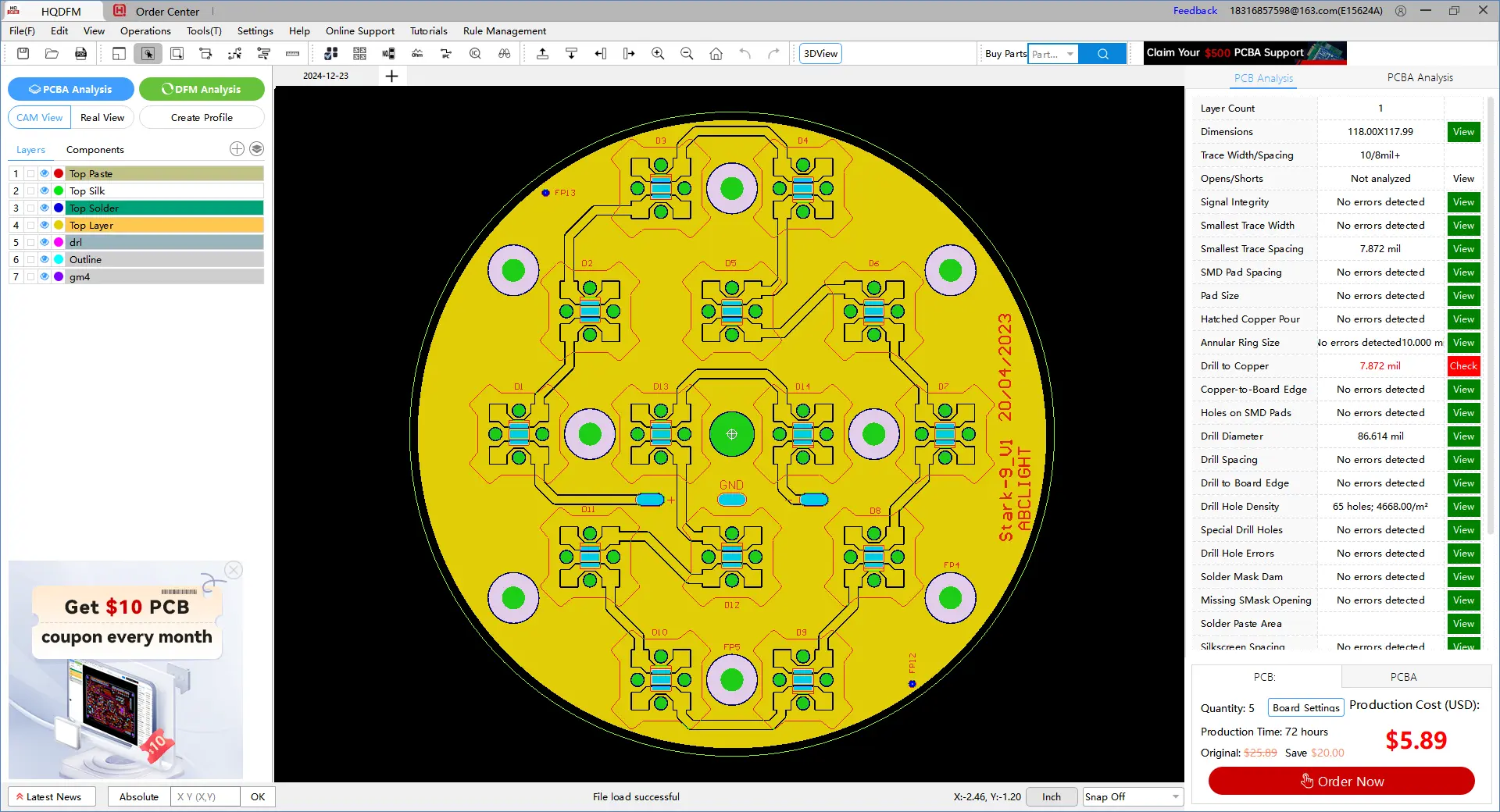
The analysis is genuinely granular rather than a handful of broad buckets. It covers, among other checks:
| Category Group | Checks (Exact HQDFM Labels) |
|---|---|
| Board basics | Layer Count, Dimensions, Trace Width/Spacing |
| Electrical integrity | Opens/Shorts, Signal Integrity |
| Trace & clearance rules | Smallest Trace Width, Smallest Trace Spacing, SMD Pad Spacing, Pad Size, Hatched Copper Pour |
| Drill & hole analysis | Annular Ring Size, Drill to Copper, Copper-to-Board Edge, Holes on SMD Pads, Drill Diameter, Drill Spacing, Drill to Board Edge, Drill Hole Density, Special Drill Holes, Drill Hole Errors |
| Surface finish | Solder Mask Dam, Missing SMask Opening, Solder Paste Area, Silkscreen Spacing |
Each result carries a clear status ("No errors detected" or a specific measured value, e.g., a drill diameter or trace spacing figure) alongside a View button that highlights the exact location of the issue on the board render. When the pass finishes, a "Manufacturability Analysis: Analysis Complete" summary dialog appears with an Export Report option, so the full result set can be saved and shared outside the tool. The DFM panel sits right next to NextPCB's quoting panel -- board quantity, production time, and price update live, so you can move from file check to order without switching tools. No login is required for the online check, and uploaded files are automatically purged after 24 hours. For the full desktop version, which adds SMT-specific analysis and PCB size calculation on top of the standard DFM pass, download HQDFM at nextpcb.com/dfm.
Best for: Engineers who want a single tool that handles both Gerber and ODB++ inputs and returns actionable DFM feedback before ordering.
URL: https://resources.sw.siemens.com/en-US/download-odb-design-viewer-download/
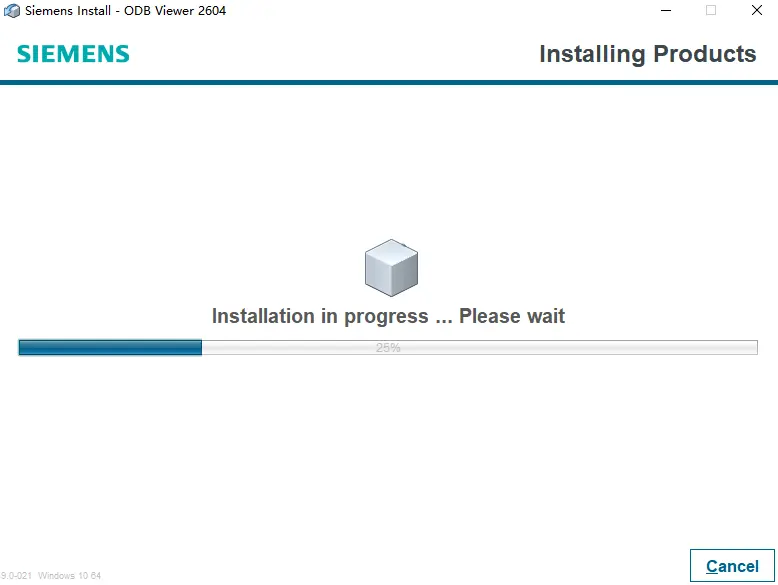
As the format's steward -- Siemens owns ODB++ following its acquisition of Valor and Mentor Graphics -- Siemens publishes the reference ODB++ Viewer directly on the official ODB++Design website. It's free to download after creating an account, no longer requires a separate registration key, and is updated alongside each new ODB++ specification release. Because it comes from the format owner, it's the most reliable tool for confirming strict format compliance.
Best for: Teams that want to verify strict ODB++ format compliance using the canonical, vendor-neutral reference tool.
URL: altium.com/viewer
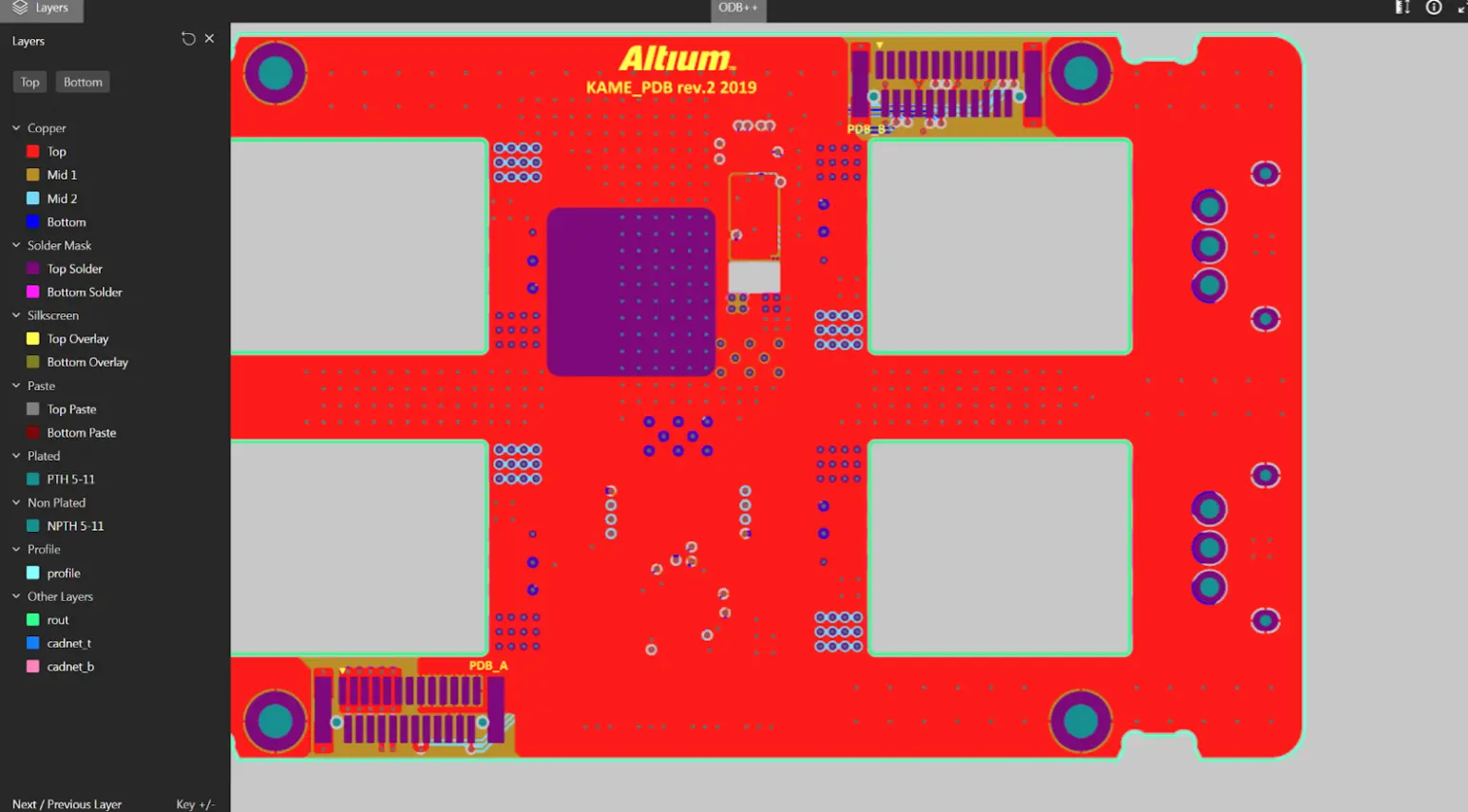
Altium 365 Viewer, already a strong pick in our Gerber viewer comparison, also accepts ODB++ files directly. Beyond layer-by-layer inspection, it adds interactive 2D and 3D board visualization, schematic viewing, BOM inspection, and component cross-probing -- capabilities most dedicated ODB++ viewers don't offer. Designs can be shared via a time-limited link without requiring the recipient to have an account.
Best for: Teams that want one tool to review both Gerber and ODB++ deliverables with full 2D/3D and schematic context.
URL: intercad.com/solution/viewer/odb-viewer
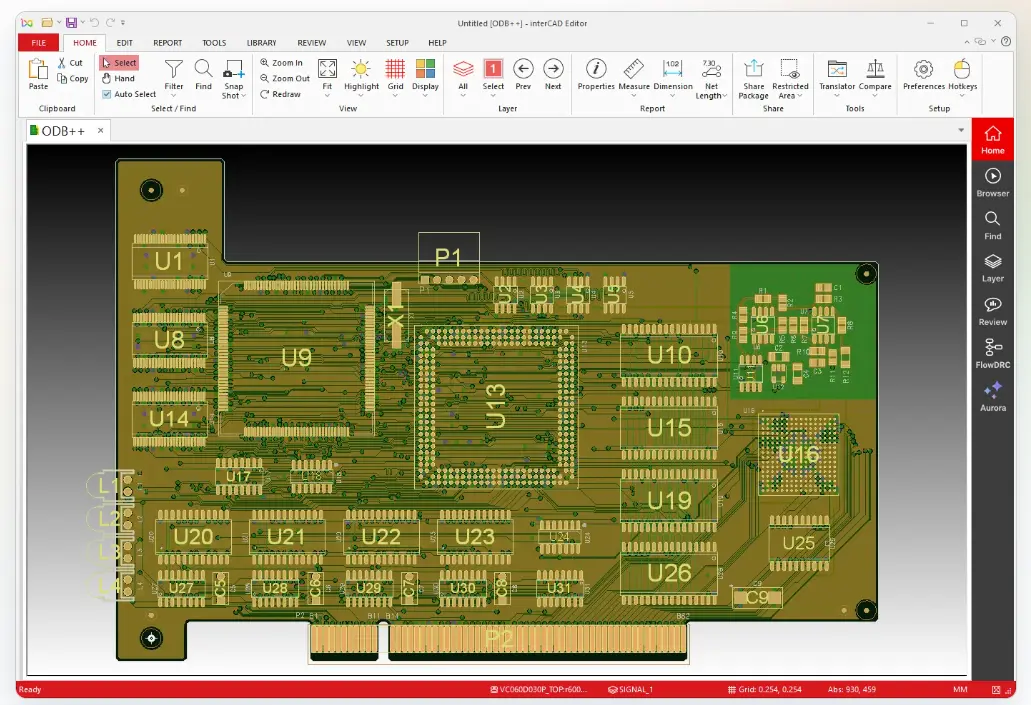
interCAD, developed by Korea-based Interxsoft, offers a dedicated ODB++ Viewer as part of its free interCAD Reader tier. It opens ODB++ folders as well as .tar, .tar.gz, .tgz, and .zip archives, and lets you expand the full layer stack-up, inspect copper and drill data per layer, and follow net and component connections. It also includes click-based measurement (clearances, pad spacing, pad dimensions), markup and annotation, and a snapshot history that can feed directly into design review documentation.
Best for: Design reviewers and cross-functional teams who need to measure and annotate ODB++ data, not just look at it.
URL: downstreamtech.com
CAM350 (now Siemens) is the professional end of this list -- a paid, commercial CAM tool rather than a free viewer, but it's the tool most CAM engineers reach for once viewing alone isn't enough. It imports and exports ODB++, IPC-2581, Gerber RS-274D/X, Excellon, DXF, HPGL, GenCAD, and PADS ASCII, and its DFMStream engine runs manufacturability analysis directly against the design -- trace clearances, annular ring checks, plane-to-anti-pad spacing, and more. Beyond viewing, CAM350 supports full CAM editing: netlist compare, panelization, NC (drill/mill) editing, and custom aperture editing.

Best for: CAM engineers and fabrication teams who need to edit, validate, and prepare ODB++ data for production -- not just view it.
URL: xjtag.com/product/xjtag-layout-viewer
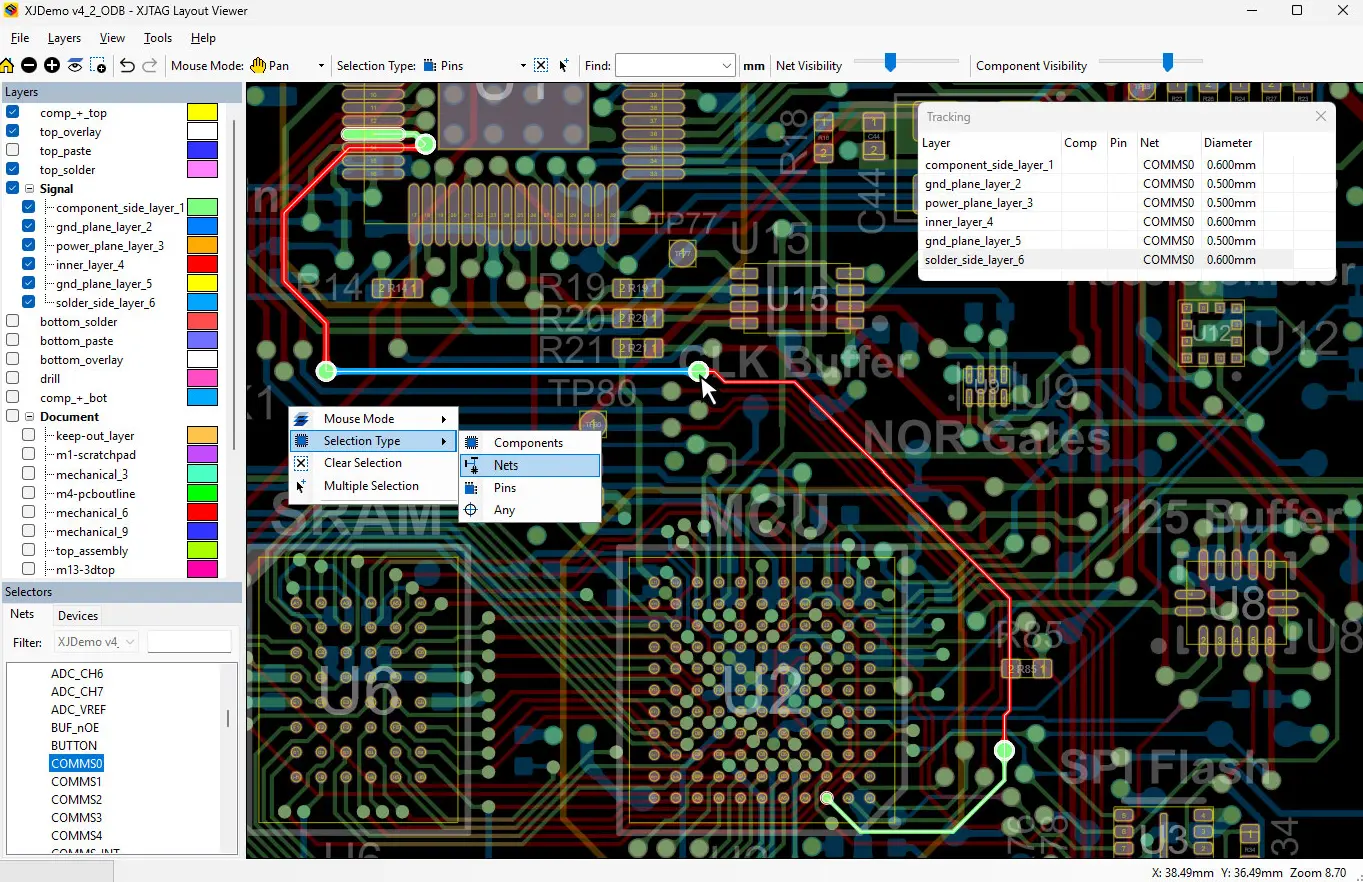
XJTAG, better known for JTAG boundary-scan test equipment, offers a free standalone Layout Viewer built specifically around net-based navigation. Search for a component, pin, or net and it's instantly highlighted on the board, making it easy to trace connections without wading through a full CAD environment. It's a lightweight, GPU-accelerated desktop application with no licensing requirements, and it integrates directly with XJTAG's test tools -- useful if debugging or repair is part of your workflow.
Best for: Test, debug, and repair engineers who need to trace nets and locate components quickly on a physical board.
URL: zofzpcb.com
ZofzPCB includes 3D ODB++ viewing as a basic, free feature of its broader PCB visualization tool. It reads both common ODB++ container types (.tar and .tgz) and uses the geometry and netlist data embedded in the archive to automatically generate 3D component models -- useful for a fast visual sanity check without manual setup. One limitation: component adjustments are saved only in ZofzPCB's proprietary project file format, so those settings don't carry over automatically to the next board revision.
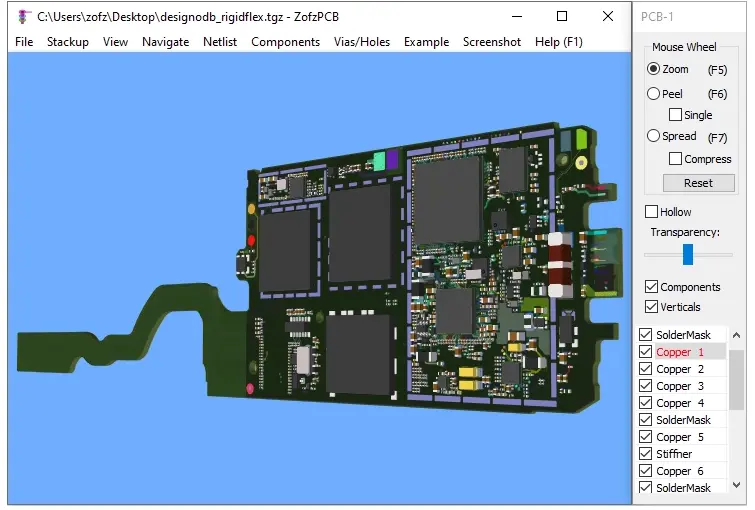
Best for: Quick 3D visual checks of an ODB++ archive without needing measurement or editing tools.
URL: igi.com
IGI PT Viewer, from Infinite Graphics Incorporated, is a free viewing and evaluation tool that accepts ODB++ alongside RS-274X (Gerber), GDSII, and DXF/DWG files via drag-and-drop. It includes a genuinely useful set of inspection tools -- measurement, zero-width geometry detection, area/perimeter calculation, and hierarchical data browsing -- for free. The catch: saving and exporting data is disabled until you purchase a license for the full IGI PT or Gen Stencil product.
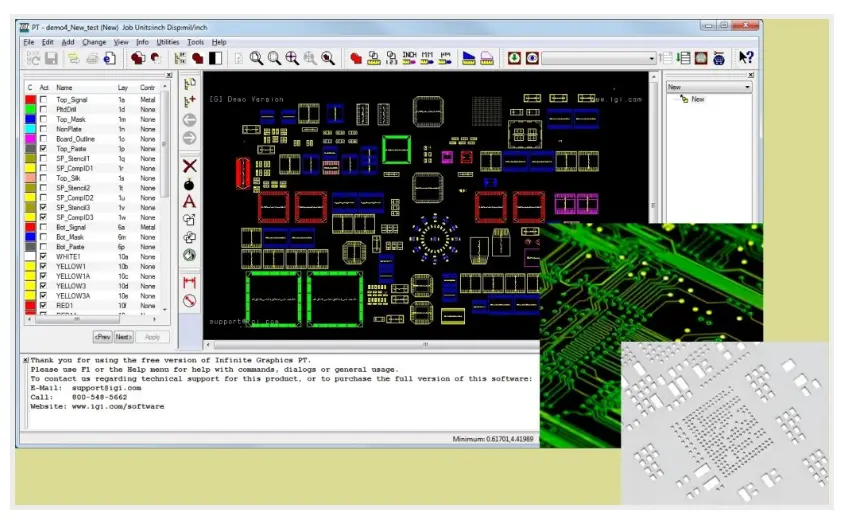
Best for: Engineers who need to inspect multiple CAM data formats (not just ODB++) in a single free viewer, without needing to save changes.
Gerber remains the dominant global standard, used for roughly 90% of PCB design data hand-offs, while ODB++ accounts for a smaller but meaningful share -- often favored by larger fabricators and CAM teams for its single-file simplicity. The right choice usually comes down to your fabricator's preference and your workflow, not raw superiority:
| Factor | Gerber (RS-274X/X2) | ODB++ |
|---|---|---|
| File structure | Multiple separate files per layer, drill, and netlist | Single consolidated archive with everything included |
| Stack-up definition | Not natively included -- must be communicated separately | Included natively in the archive |
| Adoption | ~90% of global PCB data hand-offs | Smaller share, but widely supported by major CAD/CAM/DFM tools |
| Risk of missing/misordered files | Higher -- depends on sending every required file correctly | Lower -- single archive reduces the chance of a missing piece |
| File size | Generally smaller, easier to email | Generally larger due to bundled data |
| Best when | Your fabricator's standard workflow expects Gerber, or for simple designs | Your fabricator explicitly prefers ODB++, or for complex, high-layer-count designs |
>> If you're unsure which to send, ask your fabricator directly -- most, including NextPCB, accept both. For a deeper look at Gerber-specific tools, see our Best Free Gerber File Viewer guide.
If you need to catch manufacturability issues -- not just see the layers -- the NextPCB Viewer powered by HQDFM or DownStream's CAM350 (DFMStream) are the two options on this list with real DFM engines built in. Everything else here is inspection-only.
Most tools on this list are view-only. If you need to modify pads, traces, or netlists directly in the ODB++ data, CAM350 is the only true CAM editor here; IGI PT Viewer offers limited free editing but locks saving behind a paid license.
interCAD and XJTAG both emphasize net- and component-level navigation -- interCAD for design review, XJTAG for test and debug. If you're mainly confirming layer artwork, a simpler viewer like ZofzPCB or the Siemens official viewer will do.
The Siemens ODB++ Viewer is maintained directly by the format owner and updated with each specification release, making it the most reliable choice for confirming an archive is strictly spec-compliant.
The NextPCB Viewer calibrates its DFM checks against NextPCB's own manufacturing capabilities and connects directly to the quoting flow -- useful if you're already planning to order from NextPCB.
Upload your ODB++, Gerber, or KiCad files and get an instant DFM report powered by the same HQDFM engine used in NextPCB's production environment. No sign-up required. Files auto-deleted in 24 hours.
Open Free Gerber & ODB++ Viewer Download HQDFM for Full Access
ODB++ (Open DataBase++) is a PCB data exchange format that consolidates copper layers, drill data, stack-up, netlist, BOM, and component placement into a single archive file, rather than the multiple separate files Gerber requires. It was developed by Valor Computerized Systems in 1992 and is now maintained by Siemens.
Yes. Several free options exist, including the official Siemens ODB++ Viewer, NextPCB's online viewer, Altium 365 Viewer, interCAD's Reader tier, XJTAG Layout Viewer, ZofzPCB, and IGI PT Viewer. Free tools generally offer viewing and basic inspection; DFM analysis and full editing are typically found in paid, professional CAM software like DownStream CAM350.
Gerber represents each PCB layer as a separate file and doesn't natively include stack-up or netlist data, while ODB++ bundles everything -- layers, drill data, stack-up, netlist, BOM, and component placement -- into one archive. Gerber remains more widely used globally, while ODB++ is favored by some fabricators and CAM teams for reducing the risk of missing or misordered files.
Yes, most professional CAM software -- including DownStream CAM350 and several EDA tools -- can import one format and export the other. Conversion can lose some ODB++-specific intelligence (like explicit pad/net definitions), so it's worth verifying the converted output before sending it to a fabricator.
For full CAM editing and DFM analysis, DownStream CAM350 is the most capable tool on this list, though it requires a paid license. For free format-compliance verification, the official Siemens ODB++ Viewer is the standard reference tool.
It varies. NextPCB, Altium 365 (basic mode), ZofzPCB, and XJTAG require no account. The Siemens ODB++ Viewer and interCAD's Reader tier require creating a free account before downloading.
# Last updated: July 2026. Tool features, pricing, and availability may change. Always verify current capabilities at each provider's official website.

Still, need help? Contact Us: support@nextpcb.com
Need a PCB or PCBA quote? Quote now