
 NextPCB Capabilities
Printed Circuit Boards
NextPCB Capabilities
Printed Circuit Boards
 PCB Assembly
 Layer Buildup
 SMD-Stencils
 PCB Design-Aid & Layout
 Mechanics
 Quality
 Drills & Throughplating
 Factory & Certificate
 PCB Assembly Factory Show
Certificate
PCB Assembly Factory Show
Certificate

Support Team
Feedback:
support@nextpcb.com


A multimeter is the cornerstone tool of electronic engineering, utilized to measure different parameters of electrical-based values across circuits. When evaluating a newly fabricated printed circuit board or debugging a complex prototype, the multimeter is indispensable. However, there are different symbols printed on the meter's interface that are employed to define the values of various parameters. The large number of symbols, abbreviations, and units can make it difficult for any new electronic enthusiast, procurement specialist, or junior hardware developer to learn their operation and uses.
As we navigate through 2026, with the increasing density of high-speed digital designs and IoT miniaturization, accurate manual probing is more critical than ever before sending a design out for mass PCB manufacturing. Here, we will explain each symbol in detail, its related function, and how it applies to real-world PCB troubleshooting. Let's get started!
In short: Multimeter symbols are icons printed around the rotary dial that tell you which electrical value the meter will measure — such as V― (DC voltage), V~ (AC voltage), Ω (resistance), A (current), and the sound-wave icon (continuity/beep test). Selecting the correct symbol before probing a circuit prevents blown fuses and inaccurate readings.
The short form of the multimeter is a "multiple-meter." It is a versatile electronic measuring instrument used to measure different parameters of an electrical current. In the context of hardware development, it is used to measure and verify different features of raw circuit boards, populated components, and power delivery networks. It fundamentally measures current in amperes, voltage in volts, and resistance in ohms.
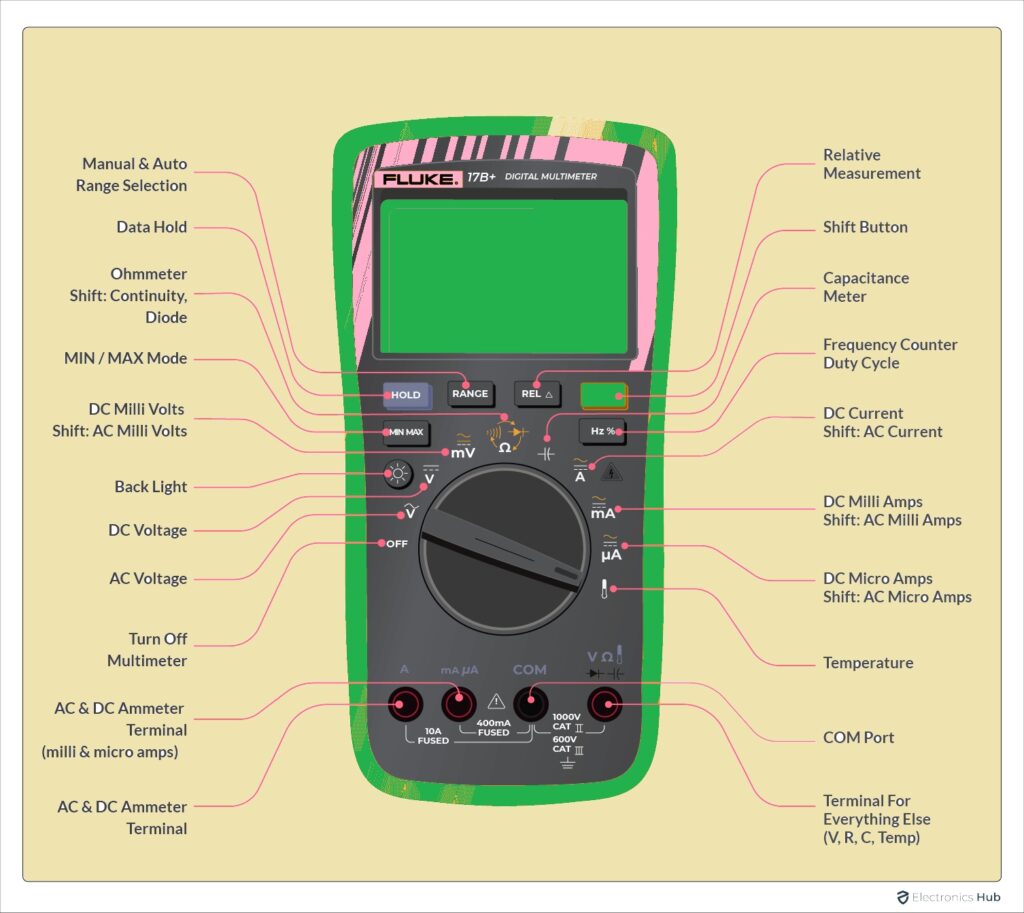
There are four main parts of this meter. The first one is the display screen that shows the calculated values. Secondly, there are function buttons used to turn it on and off, or hold values. Thirdly, it features a rotary selection dial used to vary the measuring unit and range. Finally, it utilizes two test leads (probes) that are used for physically testing connections, solder joints, and components on your PCB.
Before diving into the symbols, understanding the physical parts of the meter is crucial for any hardware developer looking to test a PCBA (Printed Circuit Board Assembly). Different parts of the meter are used to find values of different electrical parameters. Those are listed here:
>> Verifying a prototype before mass production? Check current PCB manufacturing quotes.
Understanding these basic symbols is the first step toward effective Design for Manufacturing (DFM) verification. Being able to quickly read these symbols allows you to verify components before they undergo the reflow soldering process.
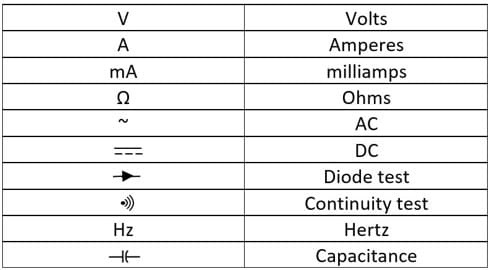
As electronic designs in 2026 demand higher precision—such as RF modules, motor controllers, and dense power management ICs—engineers frequently rely on advanced DMM functions.
Keep this quick-reference table handy on your workbench.
| Symbol | Name | Function |
|---|---|---|
| V― | DC Voltage | Measures direct current voltage (batteries, power supply outputs) |
| V~ | AC Voltage | Measures alternating current voltage (mains, audio signals) |
| Ω | Resistance | Measures resistance of resistors, traces, and fuses |
| A― | DC Current | Measures direct current amperage in series with a circuit |
| ⇘| | Diode Test | Tests diodes/LEDs and shows forward voltage drop |
| ))) | Continuity | Beeps if a path is unbroken; finds shorts and open traces |
| hFE | Current Gain | Measures DC current gain of a transistor (BJT) |
| A~ | AC Current | Measures alternating current amperage |
| °C / °F | Temperature | Measures thermal readings with a thermocouple probe |
| -||- | Capacitance | Measures capacitor value in Farads |
| Hz | Frequency | Measures signal frequency (clock signals, PWM) |
| % | Duty Cycle | Measures the high/low time ratio of a signal |
Students, new learners, and even purchasing managers reading component BOMs (Bill of Materials) may face difficulty decoding the metric prefixes used on meters and schematic diagrams. You will rarely see base units without prefixes because electronics deal with vast extremes of values.
The base units are V for Voltage, Ω for Resistance, and A for Current. These units are accompanied by standard metric prefixes:
If there is "200m" written on the selection dial of the meter, it indicates a maximum measuring range for that specific setting. Here, "m" stands for milliunits (1/1000).
If you have to measure voltage and the dial is set to 200m in the DC Voltage section, it means the highest value the meter can measure on that setting is 200 millivolts (0.2 Volts). If you attempt to measure a standard 3.3V logic line on this setting, the meter will likely display a "1" or "OL" (Over Load) to indicate the measurement is out of range. You would need to turn the dial up to the 2V or 20V setting to get an accurate reading.
Other common manual ranges include 2000m (which is 2 units), 20, 200, and so on. Always start at a higher range if you are unsure of the circuit's exact voltage, then dial down for precision.
Let’s apply this knowledge. Imagine you have just received a batch of newly assembled boards from your low cost PCB supplier. You plug in the power, and nothing happens. Here is how an engineer uses the multimeter to debug:
While mastering a multimeter is essential for engineers on the bench, manual probing is too slow for mass production. That is why professional turnkey PCB manufacturers integrate automated testing into their quality control workflows.
At NextPCB, once your boards pass through surface mount technology (SMT) lines, they undergo Automated Optical Inspection (AOI) to check for missing parts and bad solder joints. For electrical verification, we utilize Flying Probe Testing and In-Circuit Testing (ICT). These automated machines act like hundreds of robotic multimeters, instantly checking continuity, resistance, and capacitance across the entire board in seconds.
However, the synergy between a reliable manufacturer and a skilled engineer is what brings a successful product to market. You design and prototype using your DMM; we manufacture and guarantee the quality at scale.
Ready to turn your tested prototypes into mass production? Explore NextPCB's Turnkey PCBA Services today and ensure your hardware is built to perfection.
Q1: What is the difference between a manual-ranging and auto-ranging multimeter?
A: A manual-ranging multimeter requires the user to select the specific measurement limit (e.g., 20V, 200V) using the dial. An auto-ranging multimeter automatically detects the signal size and adjusts the internal range to provide the most accurate reading, which is highly beneficial for fast PCBA testing.
Q2: How do I test for a short circuit on a PCB?
A: Turn your dial to the Continuity symbol (the sound wave icon). Ensure the PCB is completely powered off. Place one probe on the power trace and the other on the ground trace. If the multimeter emits a continuous beep, there is a short circuit that needs to be fixed (likely a solder bridge).
Q3: Can a multimeter check if a capacitor is bad?
A: Yes. Advanced multimeters have a Capacitance setting (-||-). First, safely discharge the capacitor. Then, connect the probes to the capacitor's leads. The reading on the screen should match the value printed on the capacitor (within its tolerance percentage). If it reads significantly lower or shows zero, the component is degraded or dead.
Q4: Why does my multimeter read "OL"?
A: "OL" stands for Open Loop or Overload. In continuity or resistance mode, it means the circuit is completely broken (infinite resistance). In voltage or current mode, it means the value you are trying to measure exceeds the range you have manually selected on the dial.
Q5: What is the most important symbol for testing a quick turn PCB prototype?
A: The DC Voltage (V-) and Continuity (sound wave) symbols are the most frequently used. Continuity verifies that traces are unbroken and solder joints are reliable, while DC Voltage confirms that power rails are supplying the correct logic levels to your microchips.
You've mastered the multimeter — now build with confidence.
Once your prototype passes every symbol test above, get it manufactured by a partner who backs it up with 100% E-test & AOI on every board.
Get Your PCB Quote in Minutes →Still, need help? Contact Us: support@nextpcb.com
Need a PCB or PCBA quote? Quote now





