NextPCB Capabilities
 PCB Assembly
 Process Capabilities
 PCB Design-Aid & Layout
 Quality
 Drills & Throughplating
 Factory & Certificate





- Table of Contents
1. PCB Layout Rules & Principles
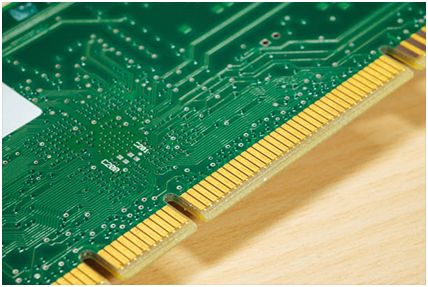
PCB layout rules:
1. Under normal circumstances, all the components should be arranged on the same side of the circuit board, only the top components are too dense, can arrange some highly limited and the heat of small components, such as chip resistors, chip capacitors, paste IC and other on low-level.
2. Under the premise of ensuring the electrical performance, the components should be placed on the grid parallel to each other or vertical arrangement, in order to be neat and beautiful, in general, do not allow components to overlap; components arranged in a compact, components in the entire layout should be distribution, density, and consistency.
3. Different components on the circuit board near the pad between the minimum spacing should be 1MM.
4. Away from the edge of the circuit board, generally not less than 2MM, the best shape of the circuit board is rectangular, the aspect ratio of 3: 2 or 4: 3.Circuit board is larger than 200MM by 150MM, should consider the circuit board can withstand mechanical strength.
PCB layout design to analyze the circuit board unit, based on the function of the layout design, the layout of all the components of the circuit, to comply with the following principles:
1. According to the flow of the circuit arrangement of the location of each functional circuit unit, so that the layout of the signal flow, and make the signal as consistent as possible.
2. The core components of each functional unit as the center, around it to the layout. Components should be uniform, overall, compactly arranged on the PCB, minimize and shorten the leads and connections between the various components.
2. PROTEL Commonly Used Shortcuts
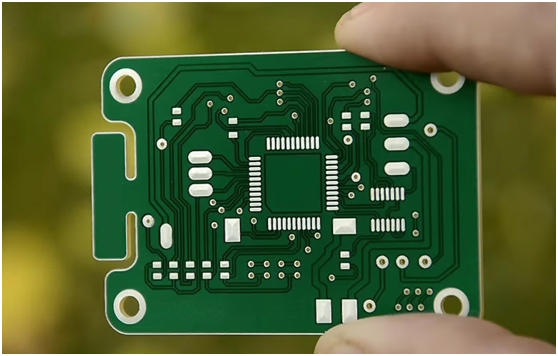
- PageDown: Mouse-centric zoom-out.
- Home: Center the position of the mouse
- End: Refresh (redraw)
- *: Switch between the top and bottom layers
- +(-): Switch layer by layer: "+" and "-" in the opposite direction
- Q: (millimeters) and mil (mill) units to switch
- IM: measure the distance between two points
- Ex: Edit X, X is the editing target, the code is as follows: (A) = arc; (C) = element;(F) = padding; (T) = wire; (V) = via; (I) = wire; (G) = fill polygon. For example, to edit the component press EC, the mouse pointer "ten" word, click the element you want to edit can be edited.
- Px: Place X, X for the target, the same code as above.
- Mx: move X, X is the moving target, (A), (C), (F), (P), (S), (T), (V), Part; (O) rotation selection part; (M) = movement selection part; (R) = rewiring.
- Sx: Select X, X is the content of the selection, the code is as follows: (I) = inner area; O = outer area; A = all; L = all layers; K = N = physical network; C = physical connection line; H = pad with the specified aperture; G = pad outside the grid.
3. Common PCB Reference Designators

Understanding the letters printed on a PCB helps in assembly and troubleshooting:
- Cx: a non-polar capacitor, power input capacitance interference
- IC / Ux: integrated circuit module / Component
- Tx: the test point (factory test)
- Spk1: Speaker (buzzer, speaker)
- Qx: a transistor (E: Emitter, B: Base, C: Collector)
- CEx: Electrolytic Capacitor
- CNx: Capacitor
- RNx: Exclusion
- CONx: Connector
- Dx: Diode
- Lx: Inductor/ Bead
- LEDx / LAMP: LED / indicator light
- Xx / Y: Crystal
- RTH: Thermistor
- CY: Y capacitor (high-voltage ceramic capacitors, safety regulations)
- CX: X capacitor (high-voltage film capacitors, safety regulations)
- W: regulator
- K / SW: switch class
- T: Transformer on the motherboard
4. Switching Power Supply PCB Design Rules
The importance of a proper layout cannot be overstated. Even in the early stages of the design of the circuit schematic is very correct, once the PCB design problems, on the reliability of electronic equipment adverse. For example, due to the power supply, ground wire interference caused by inattentive, it will make the product performance degradation, so in the design of PCB board, you need to use the right approach.
Commonly used in a switching power supply PCB board, usually each switching power supply has four current loops, which are:
- The input signal source current loop
- The power switch AC loop
- The output rectifier AC loop
- The output load current loop
The input circuit charges the input capacitor with an approximately dc current, which acts primarily as a broadband tank. Similarly, the output filter capacitor is also used to store the high frequency energy from the output rectifier while eliminating the DC energy from the output load circuit.
Critical Placement Rule: Therefore, the input and output filter capacitor terminals is very important, the input and output current loop should be connected only from the filter capacitor terminals to the power supply.
Input and output circuit settings and connections for the entire printed circuit board is very important, its reasonable or not will be directly related to the size of electromagnetic interference. The AC circuit of the power switch AC circuit and rectifier contains high-amplitude trapezoidal current, the harmonic content of these currents is very high, the frequency is much larger than the fundamental frequency of the switch. These two loops are most prone to electromagnetic interference, so these AC loops must be laid out before routing other traces in the power supply.
In the LED switching power supply input, the input circuit, each loop consists of three main components: Filter capacitors, Power switches or rectifiers, and Inductors or transformers. The three important elements should be placed next to each other, with the components positioned so that the current path between them is as short as possible.
5. The Impact of Right-Angle Traces
Right-angle alignment of the signal impact is mainly reflected in three aspects: First, the corner can be equivalent to the capacitive load on the transmission line, slow down the rise time; Second, the impedance discontinuity will cause the signal reflection; Third, the parasitic capacitance at the right angle of the transmission line can be calculated from the following empirical formula: . In the above equation, C refers to the equivalent capacitance of the corner (in pF), W refers to the width of the trace (unit: inch), εr refers to the dielectric constant of the medium, and Z0 is the characteristic impedance of the transmission line.
As the line width of the rectangular alignment increases, the impedance there will be reduced, so there will be a certain signal reflection phenomenon. The equivalent impedance after the line width increase can be calculated according to the impedance calculation formula, and then the reflection coefficient is calculated according to empirical formula: , the impedance change caused by the normal right-angle alignment is between 7% and 20%, so the maximum reflection coefficient is about 0.1.
6. The Ultimate PCB Design Checklist
Before finalizing your design, ensure you review the following checkpoints:
- Confirm that the PCB template is up to date and the positioning device is in the correct position.
- PCB design instructions and change requirements are clear.
- Confirm that the layout on the outline drawing is prohibited and the wiring area has been reflected on the PCB template.
- Compare the outline drawing, confirm that the dimensions and tolerances are correct, and the metalized/non-metalized holes are defined accurately.
- Confirm that all device packages are consistent with the company's unified library and have been updated.
- Motherboard and daughter board signals correspond correctly, connector orientation is correct, and there is no physical interference.
- Heavier components should be placed near the PCB support point or support edge to reduce warpage.
- Interface-related devices as close to the interface as possible.
- Digital-analog hybrid board device layout has been separated, the signal flow is reasonable.
- Clock device and High-speed signal device layout is reasonable.
- Terminating devices and IC decoupling capacitors are correctly placed.
- Confirm strong signal and weak signal (power difference 30dB) circuits are laid out separately.
- The heat-sensitive components are as far as possible away from high-power components.
- Have all the impedance characteristics of the differential line impedance been calculated and used to control the rules?
- Confirm that the clock line, high speed line, reset line and other sensitive lines have been routed according to the 3W principle.
- Board signal alignment can not have acute and right angles (generally a continuous turning angle of 135 degrees).
- Avoid signal lines from the power module, common mode inductors, transformers, filters under the cross.
- In order to reduce the planar edge radiation effect, the 20H principle should be satisfied.
- Adjacent layers of different power planes are avoided overlapping placement.
7. Frequently Asked Questions (FAQs)
PCB Grid & Layout Accuracy
How do grid settings affect PCB layout accuracy?
Grid settings help designers place components, traces, vias, and pads with greater precision. Using an appropriate grid size improves alignment, simplifies routing, reduces design errors, and helps ensure compliance with manufacturing requirements.
Why is it important to switch between coarse and fine grids during PCB design?
Using multiple grid resolutions improves design efficiency. A coarse grid helps speed up component placement, while a fine grid provides the precision needed for detailed routing and pad alignment.
PCB Design Shortcuts
Why are keyboard shortcuts important in PCB layout design?
Keyboard shortcuts can significantly increase design productivity by reducing the time required to access frequently used commands, speeding up component placement, routing, and editing processes.
Reference Designators
Why are component reference designators important on a PCB?
Reference designators provide a standardized way to identify components on a circuit board. They improve communication between design, manufacturing, and repair teams while reducing the risk of assembly errors.
Are PCB reference designators standardized?
Yes. Most PCB designs follow industry conventions where letters represent specific component types, such as R for resistors, C for capacitors, L for inductors, and U for integrated circuits.
Switching Power Supplies
What are the advantages of a switching power supply compared to a linear power supply?
Switching power supplies offer higher efficiency, lower heat generation, smaller size, and lighter weight compared to linear power supplies.
How can PCB layout affect the performance of an LED switching power supply?
Proper component placement, short current paths, optimized grounding, and effective thermal management help reduce electromagnetic interference (EMI), improve efficiency, and enhance long-term reliability.
Routing & DFM
Are 45-degree trace bends better than 90-degree bends?
Yes. Forty-five-degree bends are generally preferred because they provide smoother signal transitions and create a cleaner PCB layout. They are widely used in modern PCB design guidelines.
How does Design for Manufacturability (DFM) improve PCB quality?
DFM focuses on creating PCB layouts that can be manufactured efficiently and reliably. By considering fabrication and assembly capabilities during the design stage, engineers can reduce defects and lower production costs.